
All activities can be applied on the go during a weigh session.
For example, if you want to administer a medicine activity and you are applying this medicine on a per-weight basis, it is recommended that you do this as you go along.
If the animals are receiving a blanket treatment, this can be applied at the end of a session in bulk.
Find out how to apply medicines both on an individual and bulk level in this article. You can also find out how to add or remove tags against animals while weighing.
Log activities, such as administering medicine, against an individual in Quick Weigh:
- Tap the yellow '+ Activity' button. You can also select the yellow '+ Manage' button in the centre at the bottom of the screen.
- Select 'Vet & Med' for medicine, or another option if not a medicine application.
- Select 'Administer from cabinet' for medicine, or another option if not a medicine application.
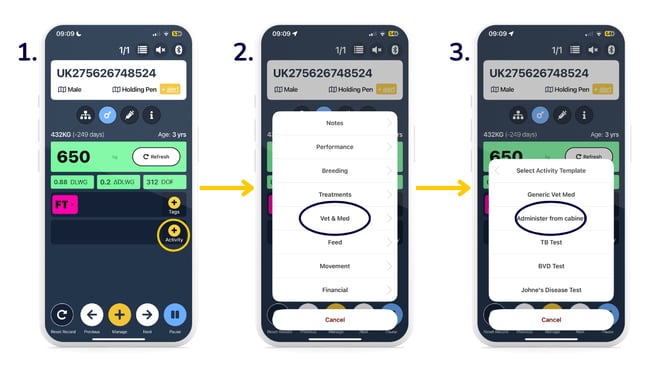
- Enter details > 'Save'.
- Against that individual, you will now see the activity listed in the activity bar. You can add more activities if you wish. If you need to remove an activity, simply click the 'x' next to the activity.
.png?width=670&height=377&name=Logging%20medicine%20in%20Quick%20Weigh%20(2).png)
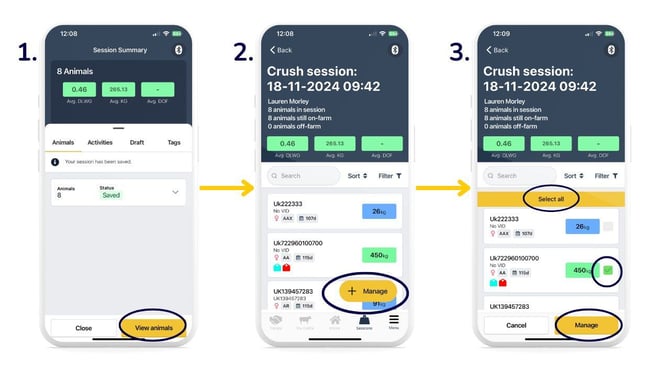
Bulk log activities, such as administering medicine, after a weigh session:
- After saving your weigh session, click 'View animals'.
- 'Manage'.
- Either 'Select all' to select all animals, or tick the boxes to the right of the individual animals (green indicates selection) > 'Manage'.
- Select 'Log activity'.
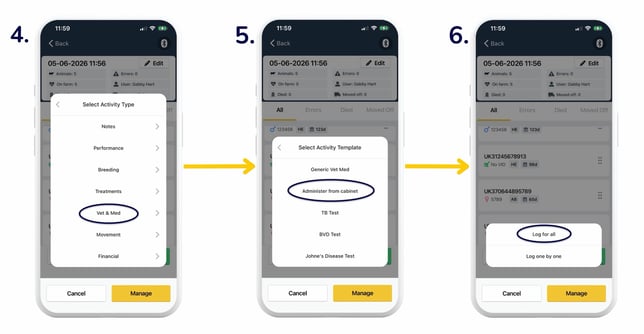
- Select 'Vet & Med' for medicine, or another option if not a medicine application.
- Select 'Administer from cabinet' for medicine, or another option if not a medicine application.
-2.jpg?width=670&height=377&name=Logging%20activity%20in%20Finished%20sessions%20(2)-2.jpg)
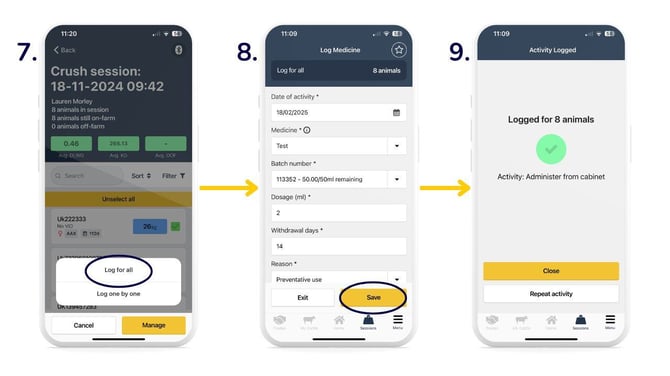
- 'Log for all' to apply the same amount of medicine to each animal, or 'Log one by one' if there are differences in application rates.
- Enter details > 'Save'.
- You will then see this screen indicating you've successfully logged the activity.
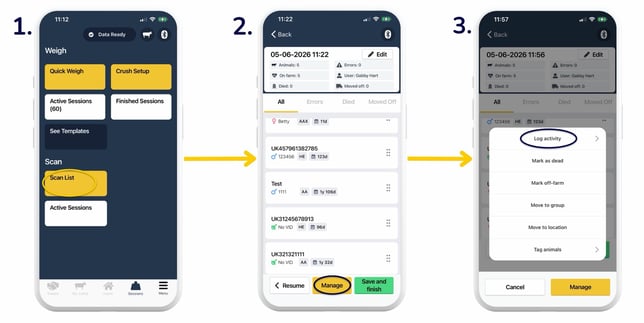
Apply activities, such as administering medicine, from a Scan List session:
- Click the 'Scan List' button, or select a session in the 'Active Sessions' section.
- 'Manage'.
- Select 'Log activity'.
- Select 'Vet & Med' for medicine, or another option if not a medicine application.
- Select 'Administer from cabinet' for medicine, or another option if not a medicine application.
- 'Log for all' to apply the same amount of medicine to each animal, or 'Log one by one' if there are differences in application rates.
- You will then see this screen indicating you've successfully logged the activity.
.jpg?width=670&height=377&name=Logging%20medicine%20in%20Quick%20Scan_active%20sessions%20(3).jpg)
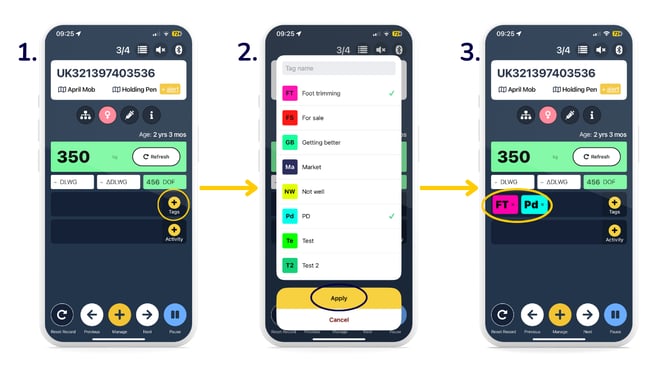
To add or remove a tag while weighing animals in Quick Weigh:
- Select 'Tags'.
- A list of previously added tags displays > select required tag/s (indicated by a green tick) > 'Apply'.
- You can see your tag/s have been applied to the animal, and it will display in the 'Tags' bar.
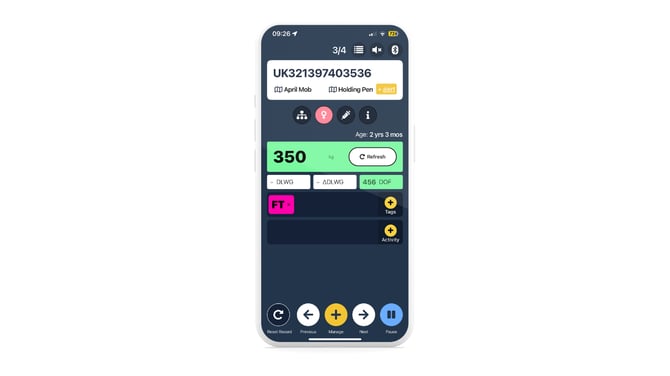
- To remove a tag, click the 'x' next to the tag you wish to remove, and it will disappear from the 'Tags' bar.
Note: if you want to apply a new tag, you need to create a new tag before starting a crush session. Please see our Tag management guide.
At the end of your session, underneath the 'Tags' tab, you can see a list of animals grouped by each management tag that has been applied. This allows you to manage and track your tagged animals.
Need some help? Use the chat window to your right on the web or the help button on your mobile app, call our Customer Support team on +44 (0) 3300 436327 or email support@breedr.co.