
The Animal Value Calculator allows you to set the price per kg for either live or carcass Weight to view the purchase price, current estimated value and change (estimated profit, from purchase to estimated sale value).
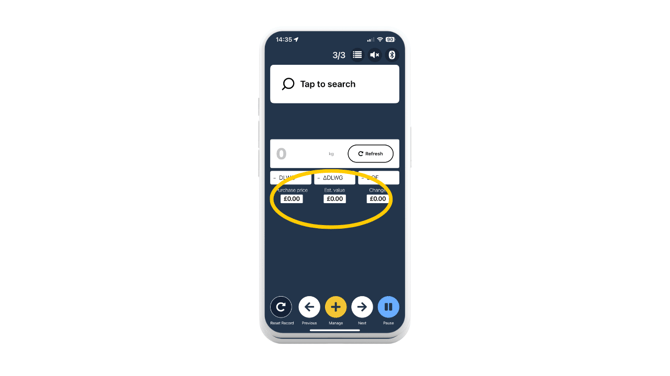
Note: You need to set up a purchase price against an animal before using this feature.
Set up your Animal Value Calculator in Crush Setup before weighing:
- In the 'Sessions tab', head to 'Crush Setup'. Enter template details if you want to (although not required) and tap the '+' button next to 'Add activity'.
- Select 'Animal Value Calculator'.
- There are 2 types of calculation you can input:
- 'Live Weight' (Value = Price x Current Weight)
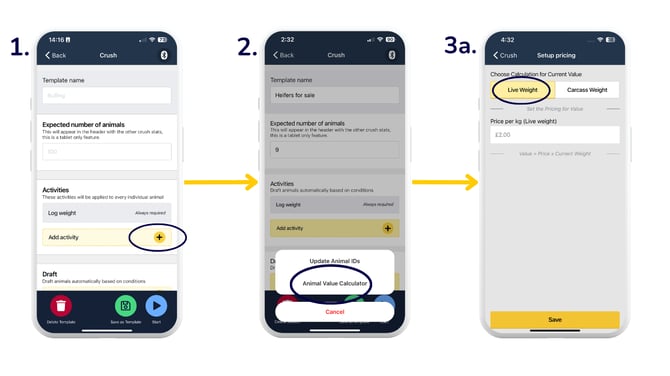
- 'Carcass Weight' (Value = Price x Kill Out % x Current Weight)
- 'Live Weight' (Value = Price x Current Weight)
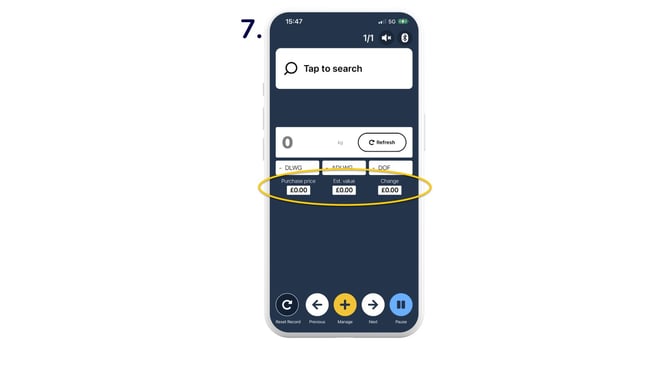
- 'Purchase price', 'Estimated value' and 'Change' fields are displayed.
- As an animal ID and weight are entered, the 'Estimated value' and 'Change' (estimated profit) are calculated and displayed beneath the weigh data, along with the previously logged purchase price.
.png?width=670&height=377&name=AVC%20-%20through%20crush%20setup%20(2).png)
Set up your Animal Value Calculator during a Quick Weigh session:
- During your weigh session, set up the Animal Value Calculator by selecting 'Manage'.
- 'Draft Settings'.
- Add in the template name and details if you would like to first, or simply just select 'Add Activity '+'.
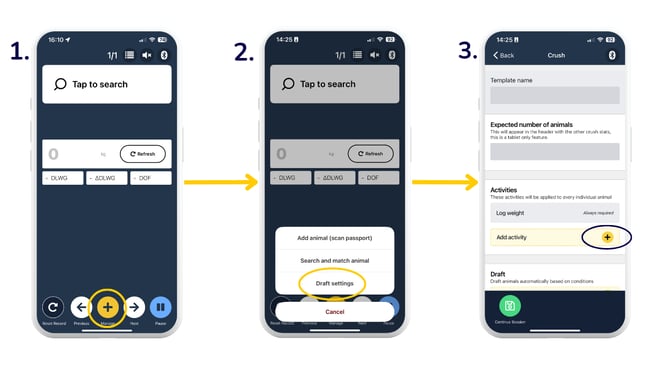
- 'Animal Value Calculator'.
- Enter values for either the 'Live Weight' or 'Carcass Weight' calculation > 'Save'.
- When you're ready, press 'Start' to begin the session. This takes you to the weigh screen. You can also 'Save as template' to use at a later time.
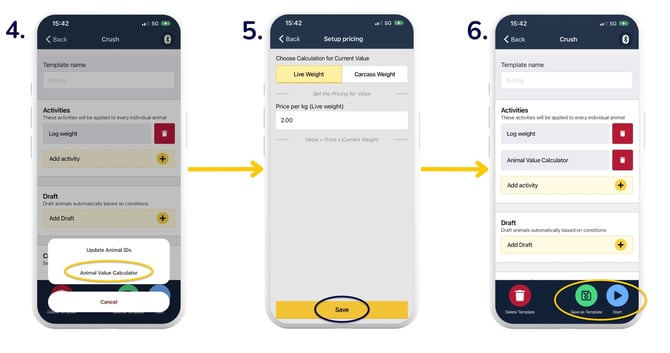
- 'Purchase price', 'Estimated value' and 'Change' fields are now displayed. As an animal ID and weight are entered, the 'Estimated value' and 'Change' (estimated profit) are calculated and displayed beneath the weigh data, along with the previously logged purchase price.
Need some help? Use the chat window to your right on the web or the help button on your mobile app, call our Customer Support team on +44 (0) 3300 436327 or email support@breedr.co.