
Top Tip: If you are repeatedly applying medicine activities, you can tap the star icon in the top right to add it as a favourite activity. This will mean you can select 'Administer from cabinet' from the 'Manage' page in the mobile app.
Log a medicine against individual and multiple animals:
- Head to 'My Cattle' and select 'Manage'.
- 'Manage'.
- Select animals by tapping the tickbox to the right of the animal/s. Select as many animals as required > 'Manage'.
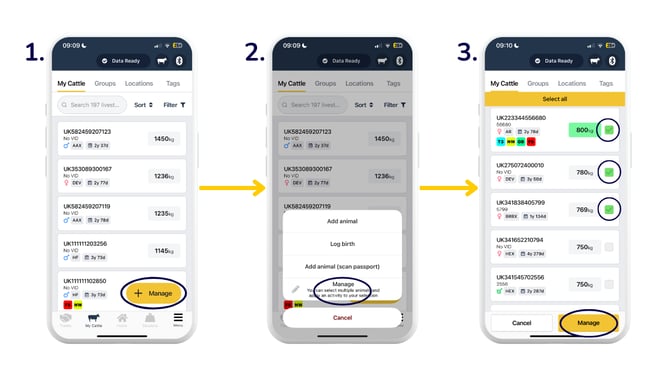
- 'Log activity'.
- 'Vet & Med'.
- 'Administer from cabinet'.
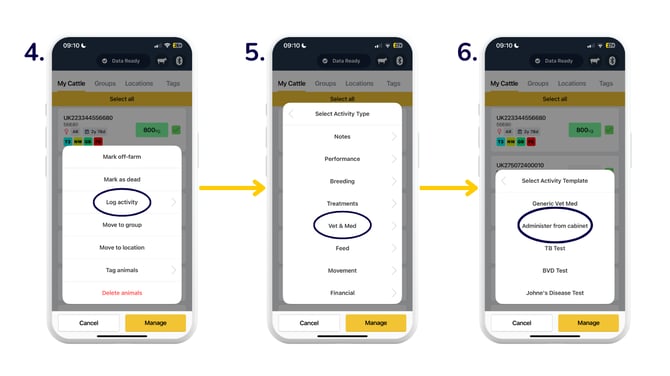
- You can either 'Log for all' to record the same medicine and amount to all animals selected, or 'Log one by one' to record different medicines and/or amounts against each animal selected.
- Use the dropdown to select a medicine from your cabinet, or click 'Create medicine' to add a new one. Additional fields will appear once selected.
- Fill out the medicine details as required > 'Save'.
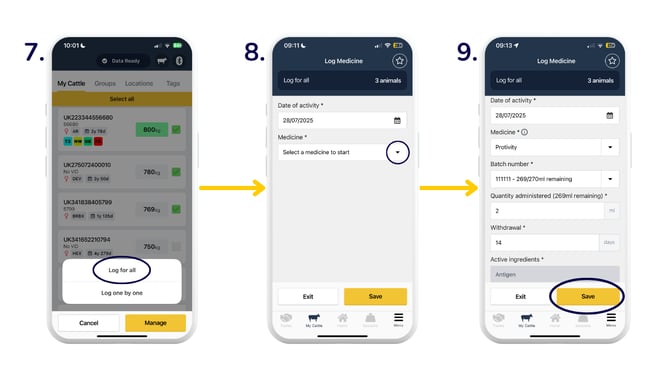
Note: The withdrawal period is for meat, not dairy. You can edit the withdrawal period in the 'Log Medicine' form.
Log a medicine against a group or a location:
- At the top of your 'My Cattle' page, select the 'Groups' or 'Locations' tab to find the cohort of animals you'd like to record a medicine activity against.
- Swipe left against the required group and select 'Log activity for animals in group' in green.
- 'Vet & Med'.
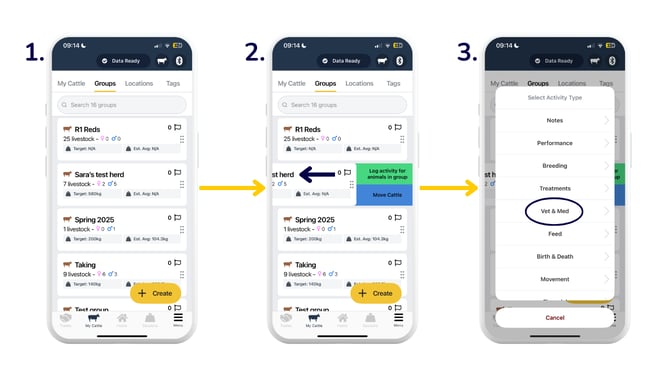
- 'Administer from cabinet'.
- You can either 'Log for all' to record the same medicine and amount to all animals selected, or 'Log one by one' to record different medicines and/or amounts against each animal selected.
- Use the dropdown to select a medicine from your cabinet, or click 'Create medicine' to add a new one. Additional fields will appear once selected. Once finished, click 'Save'.
.png?width=670&height=377&name=to%20a%20group%20(2).png)
Log a medicine activity on the web app:
You can only add a medicine via the mobile app. Once you've done this, you can come to the web app and select the animals you need to log medicine activity to. Press 'Log activity', and from the 'Vet & Med' section, select 'Administer from cabinet'. Select your medicine, check the populated details, and fill in any other information as required.
There are a number of reports available in the web app to analyse performance on farm:
-
The Herd Health report gives you an overview of treatments administered to your herd as a whole.
-
The Medicine Book report allows you to view all medicines applied to all animals for compliance purposes.
-
The Medicine Record report gives you an overview of medication reasons, medicine activities, and an overview of your Medicine Cabinet.
Need some help? Use the chat window to your right on the web or the help button on your mobile app, call our Customer Support team on +44 (0) 3300 436327 or email support@breedr.co.