
To remain compliant, it's important to safely dispose of expired or unused medicines. Breedr makes this quick and easy. Select a disposal reason, such as use on another species, when disposing of a medicine. Once disposed of, archive it if it's no longer on the farm.
Dispose of a medicine in the Breedr mobile app:
- Head to 'Menu' > 'Medicine cabinet'.
- Select the medicine you wish to dispose of.
- Tap the minus icon in the 'Amount remaining' row.
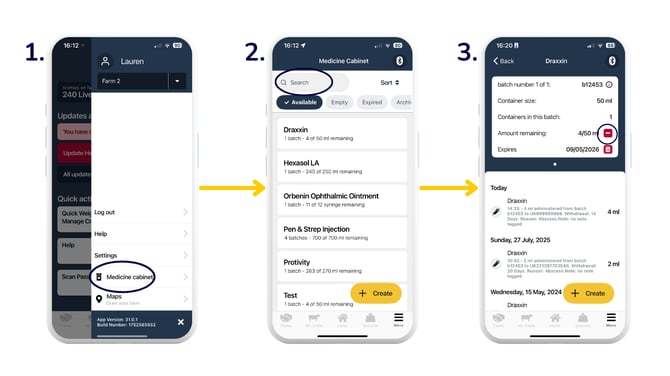
- You will then see the 'Dispose medicine' form.
- Select the 'Date of disposal', 'Quantity disposed', and disposal reason under 'Route of disposal'. Tap the tickbox next to 'Dispose all' if you want to select all remaining medicine in the bottle to dispose of. Click 'Log disposal'.
.png?width=670&height=377&name=dispose%20(2).png)
Archive a medicine in the mobile app:
Top Tip: Before archiving a medicine, make sure you have disposed of the medicine beforehand.
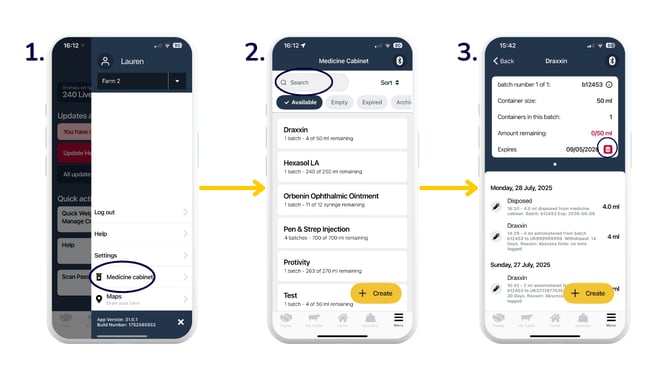
- Head to 'Menu' > 'Medicine cabinet'.
- Select the medicine you wish to archive.
- Tap the bin icon in the 'Expires' row.
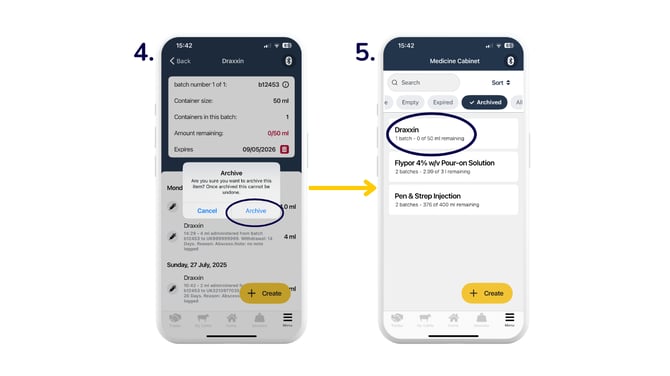
- You will then see a pop-up confirming you want to archive the medicine. Select 'Archive' to archive the medicine, or 'Cancel' to go back.
- You can then see the medicine in the 'Archived' tab.
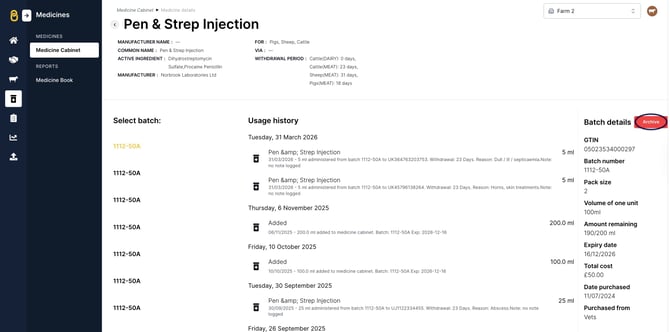
Archive a medicine in the web app:
Simply head to 'Medicines' > select the medicine > 'Archive'.
Note: If you archive a medicine by mistake, please contact our Customer Support team for assistance.
Need some help? Use the chat window to your right on the web or the help button on your mobile app, call our Customer Support team on +44 (0) 3300 436327 or email support@breedr.co.