
To log a death through Breedr is a simple two-step process from the mobile or web app:
- Record a death on your mobile or web app.
- Go to your Regulatory dashboard to either 'Send to BCMS/ScotEID', 'Don't Send' or 'Undo' registrations.
Note: If you want to register the death directly with BCMS/ScotEID, make sure registrations are switched on within your account settings before you record a death.
Log a death in the mobile app:
- Head to 'My Cattle' and select '+ Manage' to select multiple animals, or tap directly into an animal to log individually.
- If you select an individual animal, you'll see the animal details screen > select 'Manage'.
- 'Mark as dead'.
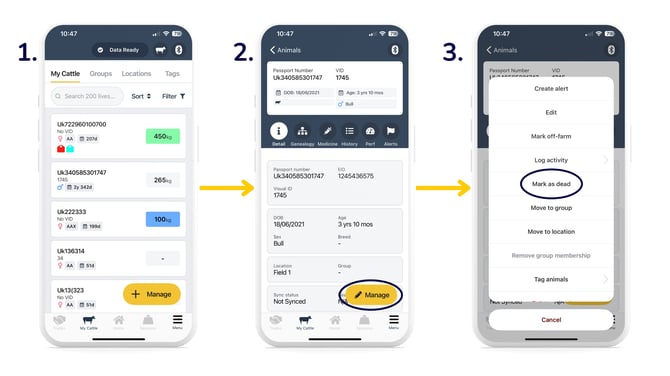
- Enter in the 'Date', 'Cause of Death', and optionally the 'Disposal Destination' (choose from your address book or manually enter) and/or the 'Cost of Disposal' > 'Mark as Dead'.
- A green banner will display at the top of your page, indicating a successful logging of death.
.png?width=670&height=377&name=log%20death%20(2).png)
Log a death in the web app:
Watch the video below to see how you record a death on the web app.
Approve registrations in your Regulatory Dashboard on the web app:
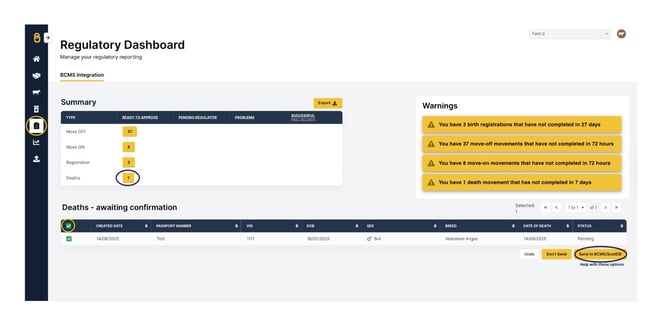
Click on the number in the 'Ready to Approve' column to bring up animal/s that you have just registered death/s for. Select the animal/s you want to approve. Selected animal/s have a green tickbox to the left of them.
- You can tap the top left box of the table if you want to bulk select the list.
- Individually select the animal/s by selecting boxes to the left of the table against a specific animal/s.
Then select:
- 'Send to BCMS/ScotEID' to notify BCMS/ScotEID of the registrations.
Alternatively, select:
- 'Don't Send' if you have already reported directly to BCMS/ScotEID outside of Breedr and/or do not use Breedr for your BCMS death registrations.
- 'Undo' if you'd like to revert/undo the registration.
If you've recorded anything incorrectly, please get in touch with the Customer Support team at Breedr before sending off the details to BCMS/ScotEID, so we can help you rectify animal details.
Need some help? Use the chat window to your right on the web or the help button on your mobile app, call our Customer Support team on +44 (0) 3300 436327 or email support@breedr.co.