
In Breedr, your medicine cabinet enables you to record and track all medicines on the farm, automatically updating quantities after each use. It's important to keep medicine names and batch numbers up-to-date.
Key features:
-
Add medicines to your cabinet by scanning the bar code directly onto your phone.
-
Automatically record batch number, quantity, and expiry date.
-
Administer and log medicines against each animal individually or in groups.
-
Automatically update medicine quantities after administering.
-
Record disposal dates and methods of disposal.
-
Archive empty medicine bottles.
-
View medicines online and download reports in line with farm inspections.
Access your medicine cabinet:
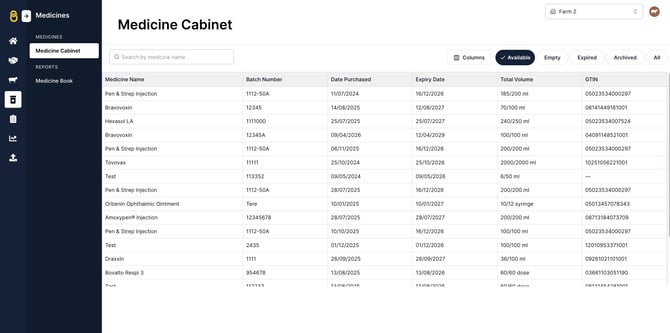
You can access the medicine cabinet on either the mobile or web app.
On the mobile app, navigate to 'Menu' > 'Medicine cabinet'.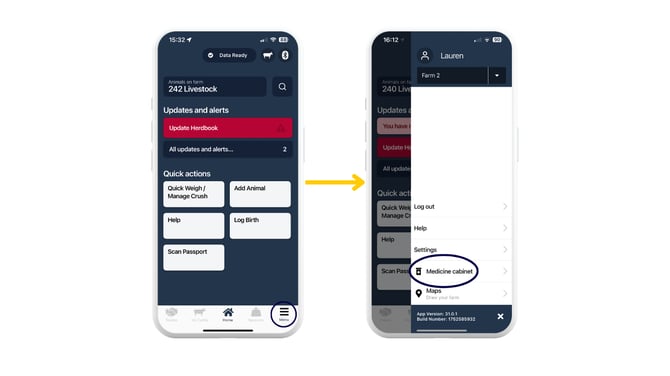
On the web app, navigate to the 'Medicines' icon:
Navigating your medicine cabinet in the mobile app:
How does it work?
-
Add your medicine to the cabinet via the Breedr mobile app.
-
Start logging medicine activities against individual or groups of animals
-
View these activities in the history timeline of the animal and the Medicine Book report.
Note: You can only add medicines via the Breedr mobile app.
Need some help? Use the chat window to your right on the web or the help button on your mobile app, call our Customer Support team on +44 (0) 3300 436327 or email support@breedr.co.