
Top Tip: Anytime you see the yellow 'Manage' button in the app, you can record an activity. Click here to find out how to record an activity in Crush mode instead.
Record breeding activities in the mobile app:
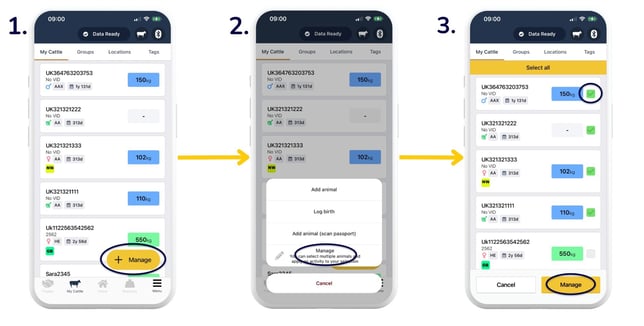
- Head to 'My Cattle' and select 'Manage' to select multiple animals to record activities against. If you'd like to add an activity to an individual animal, go straight to step 4.
- 'Manage'.
- Select animals by tapping the tickbox to the right of the animal/s. Select as many animals as required > 'Manage'.
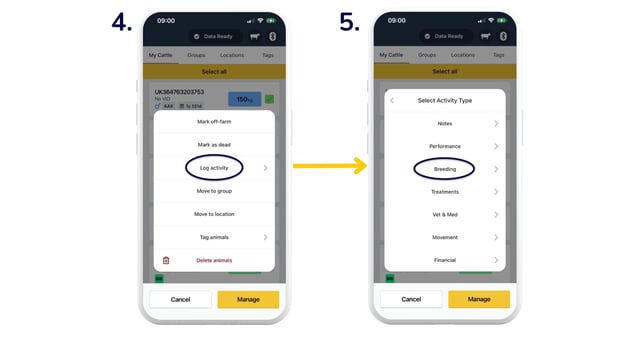
- 'Log activity'.
- 'Breeding'.
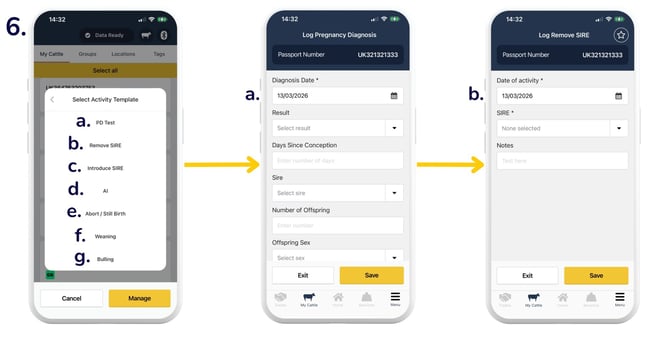
- You will then be asked whether you want to:
- Log 'PD Test': select the 'Diagnosis Date', 'Result', 'Time Since Conception' (in days), 'Sire', 'Number of Offspring', 'Offspring Sex', and optionally add any notes. There is also an option to create an alert for the expected due date for a positive pregnancy result, which can be ticked or unticked as required. Select 'Save'.
- 'Remove SIRE': select the 'Date', 'SIRE' (pulled from your 'Sires List' in your app settings), and optionally add any notes > 'Save'.
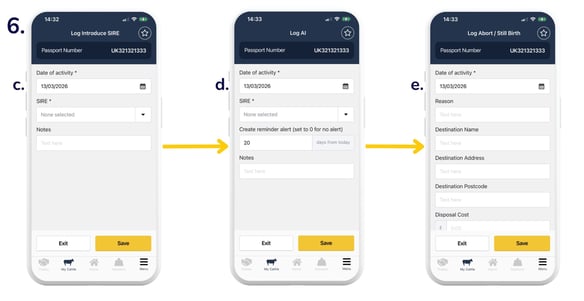
- 'Introduce SIRE': select the 'Date', 'SIRE' (pulled from your 'Sires List' in your app settings), and optionally add any notes > 'Save'.
- Log 'AI': select the 'Date', 'SIRE' (pulled from your 'Sires List' in your app settings), and optionally 'Create reminder alert' and add any notes > 'Save'.
- Log 'Abort/Still Birth': select the 'Date', 'Reason', and any disposal information you'd like to record > 'Save'.
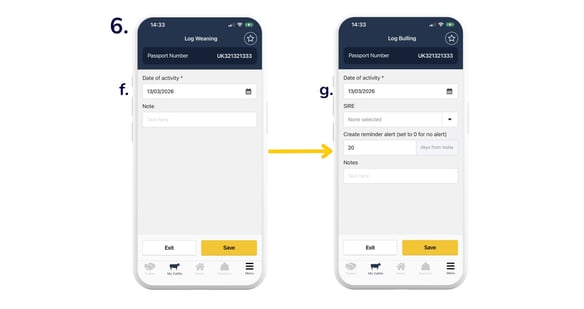
- Log 'Weaning': select the 'Date' and optionally add any notes > 'Save'.
- Log 'Bulling': select the 'Date', 'SIRE' (pulled from your 'Sires List' in your app settings), and optionally 'Create reminder alert' and add any notes > 'Save'.
Record breeding activities in the web app:
From the 'My Cattle' page, you can select individual or multiple animals to record various activities, each of which is subsequently stored within the individual history of the selected animal/s.
To apply the same details to all selected animals, choose 'To all selected animals'. To apply different details for each animal within the cohort, select 'To individual animals'.
Top Tip: The Breeding KPI report in the web app shows a surface-level analysis of all breeding activities, including service activities, pregnancy activities, calving activities, and weaning activities. The 'Definitions' tab provides a full description of report analytics.
Need some help? Use the chat window to your right on the web or the help button on your mobile app, call our Customer Support team on +44 (0) 3300 436327 or email support@breedr.co.