
Farm software details are different to your BCMS/CTS/ScotEID login and your Government Gateway details.
The user ID for:
- BCMS users: consists of 9 numbers separated by hyphens e.g 123-456-789.
- ScotEID users: your email address.
The password for:
- BCMS users: combination of 7 capital letters and numbers e.g AB1C2D3.
- ScotEID users: the password you have directly set up on ScotEID.
You can request your farm software user ID and password details through your Breedr mobile or web app.
Request details from the mobile app:
-
Go to 'Menu' > 'Settings'.
- 'Connected Systems'.
- Tap 'Click here' to request your CTS farm software details.
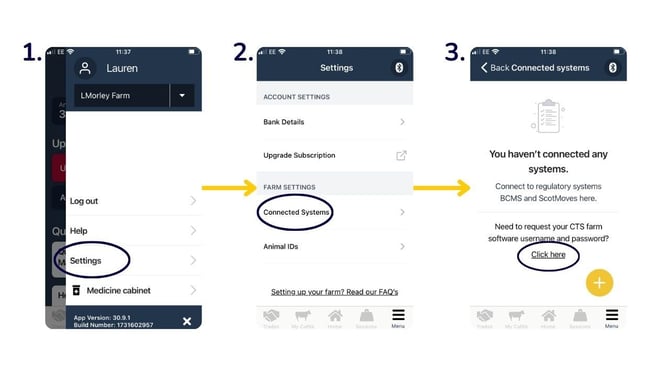
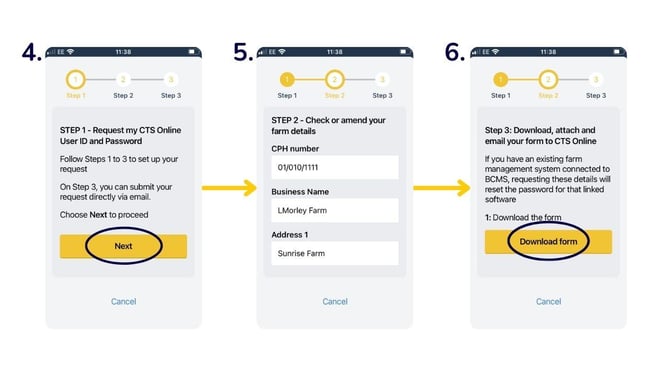
- 'Next'.
- Enter your 'CPH number', 'Business Name', and 'Address'.
- Click 'Download form'. You can then send this form as an attachment to bcmsenquiries@rpa.gov.uk.
Request details from the web app:
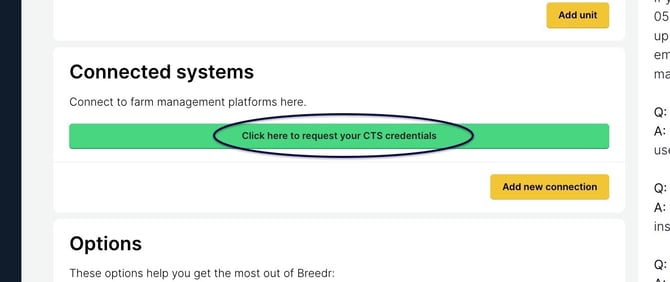
Go to 'Settings' > 'Farm Management' > 'Click here to request your CTS credentials'.
Fill in the pre-populated request form. Download the form by clicking 'Download now', and then 'Send email' to send the form to the BCMS Enquiries team.
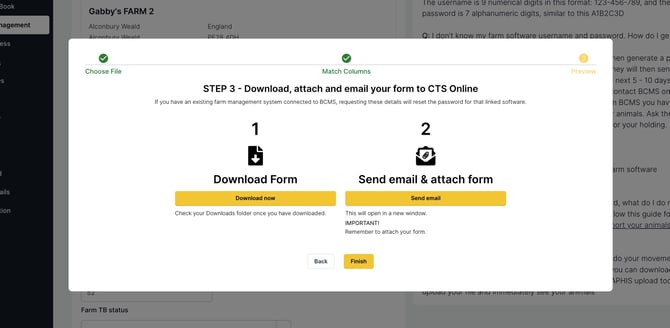
Note: BCMS will send your user ID and password directly via two separate emails within 5-10 days of being requested.
Contact BCMS directly:
You can contact BCMS on 0345 050 1234 (or 0345 050 3456 if you are in Wales). Inform BCMS that you have set up an account with Breedr and you need to import your animals. Ask them to email you the farm software user ID and password for your holding.
This may take a few days to generate and email to you.
Relevant articles:
Set up BCMS/ScotEID connection
Mobile app and web app overview
Scan passports and add animals via the mobile app
Need some help? Use the chat window to your right on the web or the help button on your mobile app, call our Customer Support team on +44 (0) 3300 436327 or email support@breedr.co.