
Note: Make sure movements are switched on within your account settings before you add animals and/or scan your passports if you want to register the movement on Breedr.
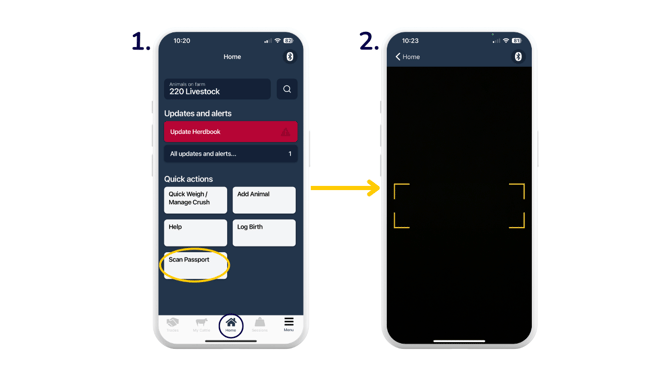
The quickest way to add animals onto Breedr is via the 'Scan Passport' button on the home page of the mobile app. Scan the bottom barcode of the animal passport to automatically pull across the number, date of birth, sex and breed of the animal.
If you do not have the passport for the animal/s, you can use the 'Add Animal' button on the home page of the app to manually enter the animal details.
Scan animal passports:
- From your home screen, you can go straight to 'Scan Passport'.
- The camera pops up. Scan the bottom barcode of the animal passport to automatically pull through the passport number, date of birth, sex and breed to the 'Add Animal' form. Follow on from step 3 below.
Add an animal via the mobile app:
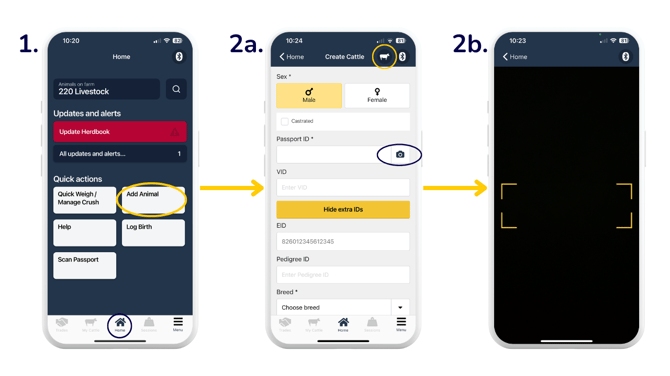
- From your home screen, click 'Add Animal'.
- Fill out the form accordingly.
- Use the species icon to ensure you're correctly recording either cattle or sheep. If the animal is a steer, ensure you tick 'Castrated'.
- The camera icon against the 'Passport ID*' takes you to this screen where you can scan the bottom barcode in order to automatically pull through the number, date of birth, sex and breed.
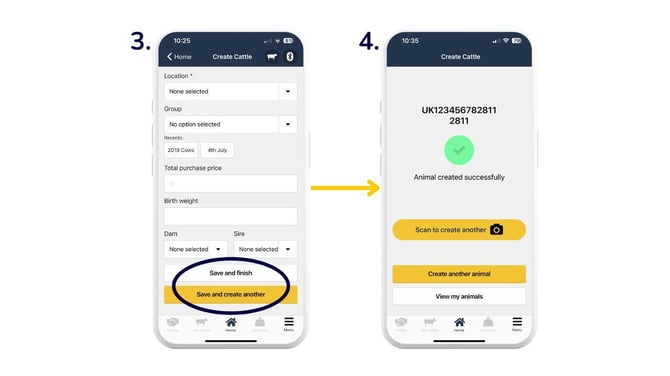
- Once you've filled out the required and additional details you want to add, click 'Save and finish' if you have no more animals to add, or 'Save and create another' to add another animal.
- You will see this screen display when you've clicked 'Save and finish'. 'Save and create another' takes you to the screen in step 2.
Note: If you process your animal movements with Breedr, adding animals/scanning passports will create 'ON Movements' that will need to be approved on your Regulatory Dashboard in the web app.
Need some help? Use the chat window to your right on the web or the help button on your mobile app, call our Customer Support team on +44 (0) 3300 436327 or email support@breedr.co.