
To upload live weights into Breedr, you need to either download your session file from your weigh head to your computer or create your own CSV file. The information will save against each individual animal record and can be viewed in the reporting section of the app.
What information do you need in the CSV file to upload live weights to Breedr?
- Animal ID (passport number or EID number)
- Weigh Date
- Weights
You can download the Live Weight template provided to create your CSV file.
Upload your weight CSV file to the web app:
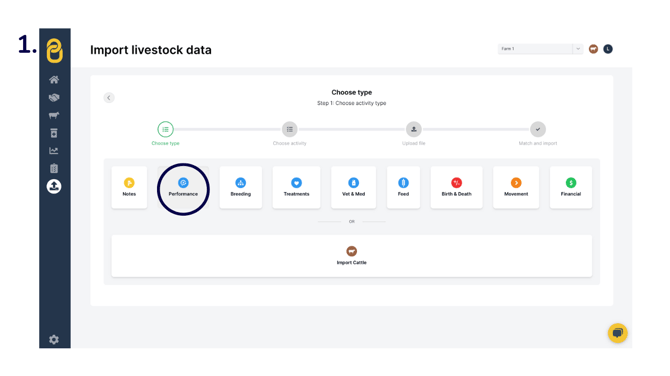
- From the 'Upload' tab, select 'Custom Import' > 'Performance'.
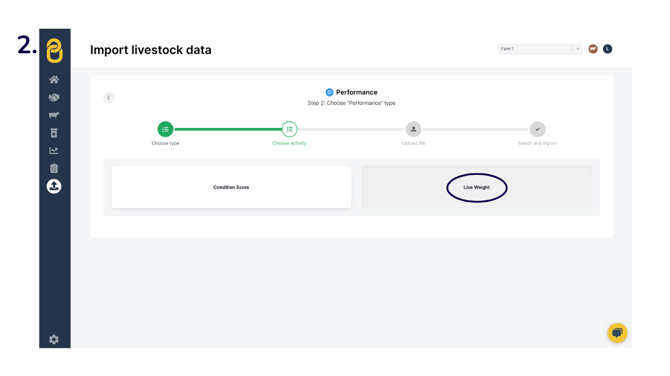
- 'Live Weight'.
- Upload your CSV file by clicking 'Upload file' and selecting the file you wish to upload.
-1.png?width=670&height=377&name=csv%20upload%20(2)-1.png)
- Click 'Next', or, if you have uploaded the incorrect file, select 'Change file'.
.png?width=670&height=377&name=csv%20upload%20(3).png)
- Match the headings as necessary. To assign or change a column header, use the dropdown arrows to find the appropriate heading.
- Green indicates an exact match with our system's column headings.
- Yellow means that the system has made an assumed match, or you've manually selected a heading.
- 'IGNORE' columns will be excluded from the upload, so if these columns are required, ensure a heading has been selected.
.png?width=670&height=377&name=csv%20upload%20(4).png) Important: Please double-check that all column headers are correctly matched before clicking 'Finish upload'.
Important: Please double-check that all column headers are correctly matched before clicking 'Finish upload'. - A green banner will display if you have successfully uploaded the carcass sale information against the animals. Click 'View all animals' to see the updated information.
.png?width=670&height=377&name=csv%20upload%20(5).png)
There are a number of reports available in the web app to analyse performance on farm:
-
The Farm Performance report allows you to see performance by group, location, and breed.
-
The Animal Forecast report allows you to view animal forecasts by date, weight, and days on farm.
-
The On Farm Weights report allows you to see all weights recorded on farm.
Need some help? Use the chat window to your right on the web or the help button on your mobile app, call our Customer Support team on +44 (0) 3300 436327 or email support@breedr.co.