
What the Calculator Shows:
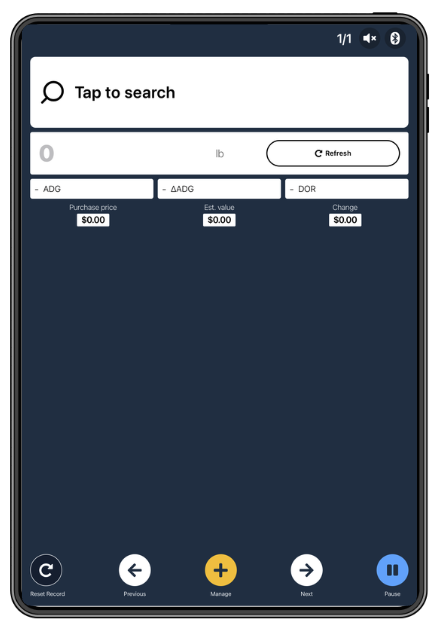
For each animal weighed during a session, the Animal Value Calculator displays:
|
Field |
What it means |
|
Carcass Weight |
Value = Price x Kill Out % x Current Weight |
|
Live Weight |
Value = Price x Current Weight |
|
Purchase price |
What you paid for the animal, pulled from the purchase price logged in Breedr |
|
Estimated value |
Current value based on today's weight and the price per pound you set |
|
Change |
Estimated profit or loss: the difference between purchase price and estimated value |
Purchase price must be logged first. The Change (profit) calculation only works if a purchase price has been recorded against the animal in Breedr. Animals without a purchase price will show an estimated value but no profit calculation. See Purchase Price and Sale Price to add purchase prices to your cattle.
Set up the Animal Value Calculator:
You can configure the calculator two ways: before your session starts in Chute Setup, or during an active Quick Weigh session.
Option 1: Set up in Chute Setup Before Weighing
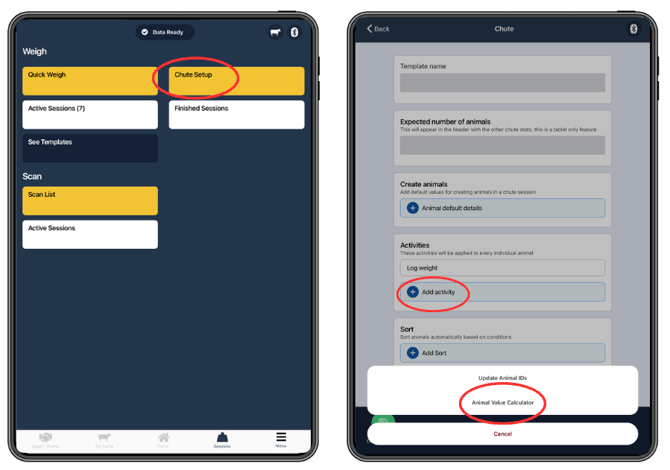
- Tap "Sessions" from the bottom navigation bar.
- Tap "Chute Setup."
- Enter your template details if needed (not required to use the calculator).
- Tap the "+" button next to "Add activity."
- Select "Animal Value Calculator" from the activity list.
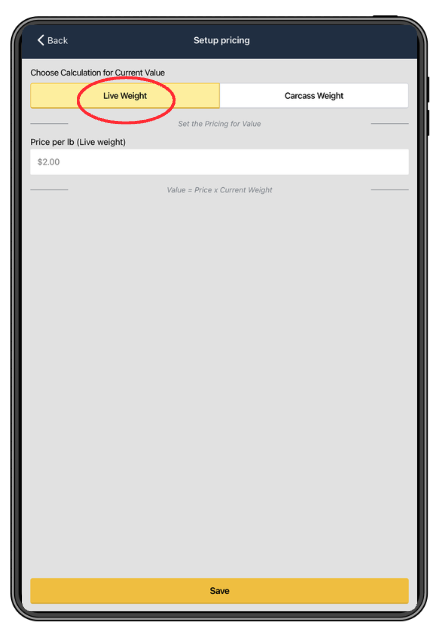
- Select the price type:
- Live weight: price per pound based on the live animal's scale weight
- Carcass weight: price per pound based on an estimated carcass weight
- Enter your price per pound ($/lb).
- Tap "Save."
The calculator is now active for any Quick Weigh session that uses this Chute Setup template.
Option 2: Set up During an Active Quick Weigh Session
If you did not set up the calculator before starting:
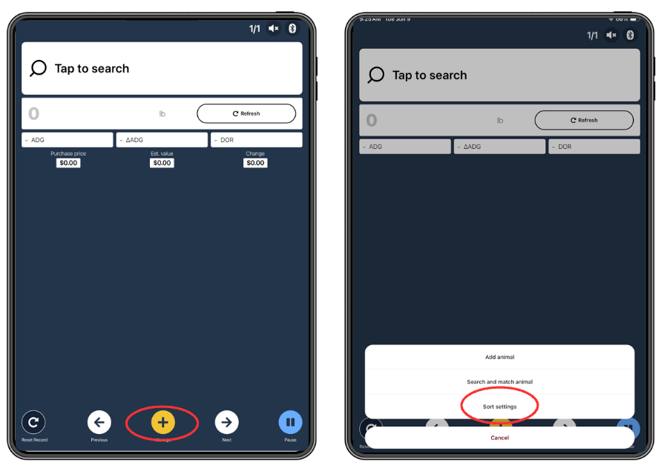
- Start a Quick Weigh session as normal.
- Tap "+ Manage"
- Select "Sort Settings"
- Follow Steps 4-8 as above in Option 1
The calculator activates immediately for all remaining animals in the session.
Using the Calculator During a Session:
Once the Animal Value Calculator is active and an animal is scanned and weighed:
- The animal's purchase price appears on screen (if logged in Breedr).
- The estimated value is calculated automatically from the animal's current weight and the price per pound you set.
- The change (profit or loss) displays below: green if positive, red if negative.
- Move to the next animal. The calculator resets and recalculates for each new scan.
Choosing Between Live Weight and Carcass Weight Pricing:
|
Price type |
When to use it |
|
Live weight |
You are selling or buying animals at a live price, most common for sale barn purchases, sale barn sell-off, or when marketing cattle on the hoof
|
|
Carcass weight |
You are marketing cattle on a carcass weight grid and want to estimate value based on projected dressed weight
|
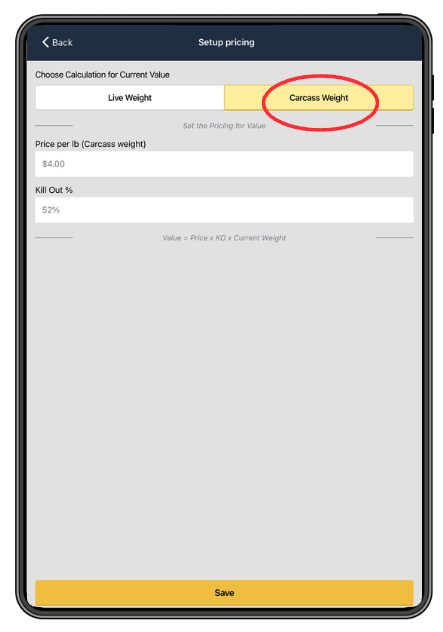
Carcass weight pricing uses an estimated dressing percentage to convert live weight to projected carcass weight. Confirm with the product team what dressing percentage Breedr applies and whether it is adjustable.
Update the Price Mid-Session:
If you are comparing pens at different price points, or if the market price changes during a long session:
- Tap the Animal Value Calculator on the session screen.
- Update the price per pound.
- Tap "Save." The new price applies to all subsequent animals.
Previous animals in the session are not recalculated retroactively.
What the Calculator Does Not Include:
The Animal Value Calculator is a quick reference tool, not a full financial model. It does not account for:
- Freight and hauling costs
- Commission and sale barn fees
- Shrink (weight loss during transport)
- Veterinary or processing costs
- Feed costs since purchase
Need some help?
Use the chat window in the bottom right of the screen, call our Customer Success team at (737) 412-3131, or email us at supportusa@breedr.co.