
Note: Only admin users of the account can view and update subscription details in the Breedr app.
Update your card details in the mobile app in Breedr:
- Head to 'Menu' > 'Settings'.
- 'Subscription'.
- On the subscription page, you then have a couple of options relating to payment and invoices.
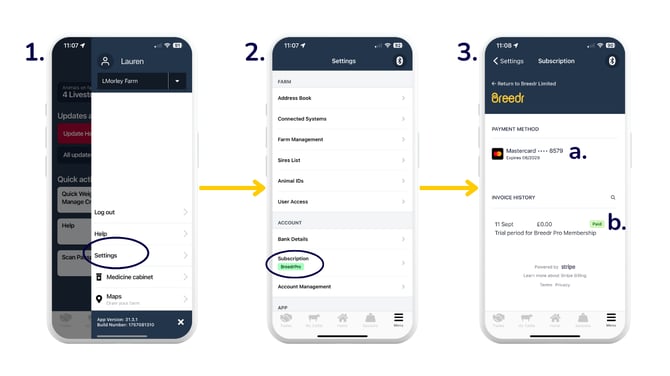
- Check and/or update your card details.
- Click through to download your invoice and/or receipt for your subscription.
Update your card details in the web app in Breedr:
- Head to 'Settings' > 'Subscription' > 'Manage'.
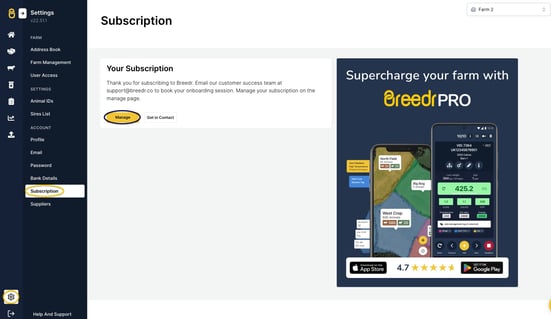
- On the subscription page, you then have a couple of options relating to payment and invoices.
- Check and/or update your card details.
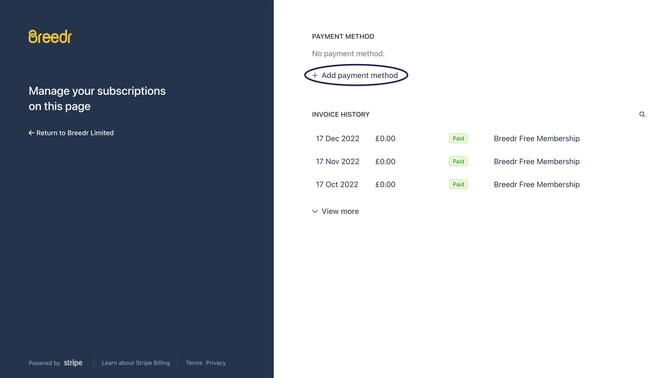
- Click on any of the invoices to download your invoice and/or receipt for your subscription.
- Check and/or update your card details.
Need some help?
Use the chat window, call our Customer Success team at (737) 412-3131 or email us supportusa@breedr.co