
Why bookmark it?
The Breedr browser at https://app.breedr.tech gives you full access to your account from any device with a browser. Saving it to your home screen works like installing an app, it opens in full screen with no address bar in the way.
This is especially useful if you manage your ranch from an iPad, Android tablet, or a shared computer where downloading apps isn't an option.
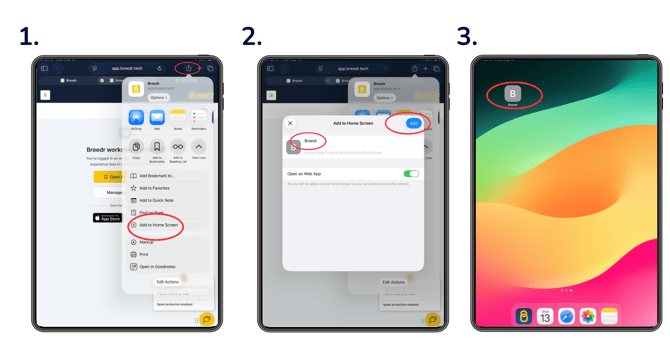
iPhone or iPad (Safari)
- Open Safari and go to app.breedr.tech.
- Log in to confirm the page loads correctly.
- Tap the Share button at the bottom of the screen (the square with an arrow pointing up).
- Scroll down the share menu and tap "Add to Home Screen".
- Edit the name if you'd like, "Breedr" works well, then tap "Add" in the top right corner.
- The Breedr icon now appears on your home screen. Tap it to open directly.
Android Phone or Tablet (Chrome)
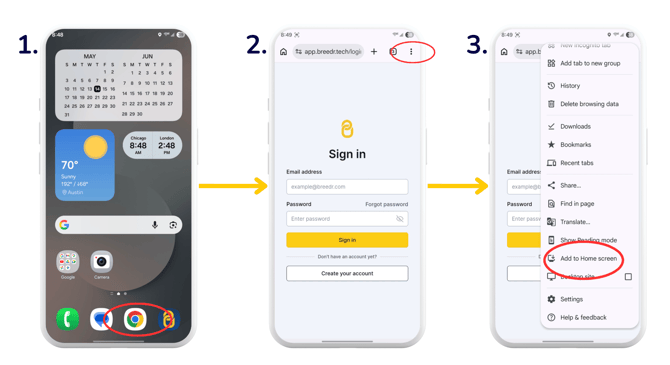
- Open Chrome and go to app.breedr.tech.
- Log in to confirm the page loads correctly & Tap the three-dot menu (⋮) in the top right corner of Chrome.
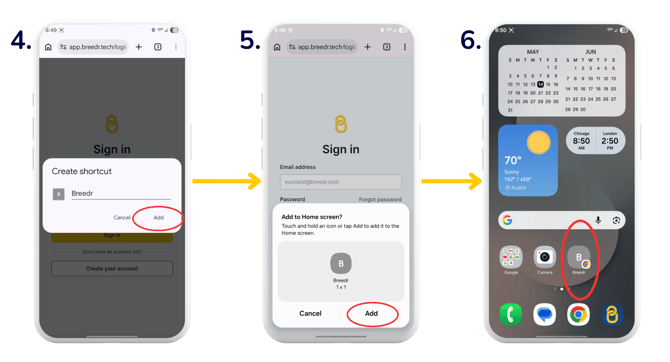
- Tap "Add to Home Screen".
- Edit the name if needed, then tap "Add".
- When prompted, tap "Add" again to confirm placement on your home screen.
- The Breedr icon now appears on your home screen. Tap it to open directly.
Desktop or Laptop Computer (Chrome)
Bookmarking in Chrome adds Breedr to your bookmarks bar for one-click access from any browser window.
- Open Chrome and go to app.breedr.tech.
- Log in to confirm the page loads correctly.
- Click the star icon (☆) on the right side of the address bar.
- Edit the name to "Breedr" and choose "Bookmarks bar" from the folder dropdown.
- Click "Done".
- The Breedr bookmark now appears in your bookmarks bar at the top of every Chrome window.
If you don't see the bookmarks bar, press Ctrl + Shift + B (Windows) or Cmd + Shift + B (Mac) to show it.
Logging in
Once you've bookmarked or saved Breedr to your home screen, use the same email and password you used to sign up. If you've forgotten your password, see Reset or Update Your Account Password.
Need some help?
Use the chat window in the bottom right of the screen, call our Customer Success team at (737) 412-3131, or email us at supportusa@breedr.co.