
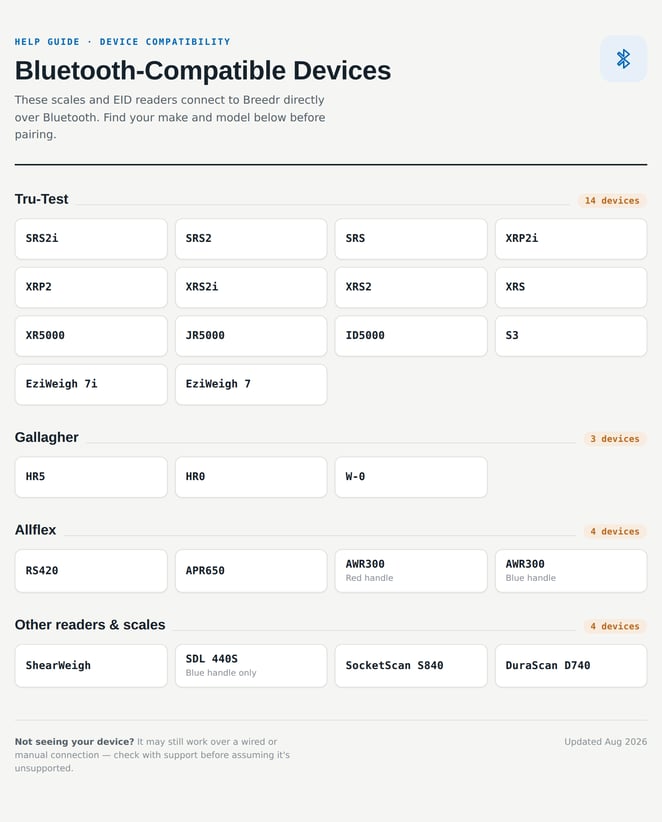
What works well with Breedr:
Thinking about Buying Equipment?
If you'd like to purchase TruTest or Allflex equipment, contact our Customer Success team! We can help you place an order and make sure you get the right setup for your operation.
- Chat: Click the chat window in the bottom right of this page
- Phone: (737) 412-3131
- Email: supportusa@breedr.co
Choosing the Right Equipment:
Not sure which device is right for your operation? Here's a quick guide:
For scanning individual animals by hand at the chute: The TruTest SRS2i or Allflex APR650 are the most common choices. Both are handheld stick readers. The APR650 also reads TSU barcodes if you use tissue sampling.
For scanning animals as they walk through a panel without hand-scanning: The TruTest XRP2 or XRP2i panel readers are designed for this. The XRP2 comes in small or large antenna sizes depending on your chute opening width.
For weighing animals: The TruTest S3 and TruTest EziWeigh 7i both connect to Breedr to send live weights directly into your session. The S3 uses Bluetooth Low Energy and connects directly in the app; the EziWeigh 7i pairs through your phone's Bluetooth settings first.
For reading TSU barcodes: The Allflex APR650, Allflex AWR300, and Socket Mobile DuraScan D740 all read barcodes. The APR650 and AWR300 read both EID tags and barcodes in one device. The D740 is a dedicated barcode-only scanner.
Running EID scanning and weighing together: Connect both an EID reader and a weigh head in the same session. Always connect the EID reader first, the weigh head signal can interfere with EID reader pairing if connected in the wrong order.
Need some help?
Use the chat window, call our Customer Success team at (737) 412-3131 , or email support supportusa@breedr.co