
Before You Start:
- Charge the RS420 fully before connecting.
- Confirm Bluetooth is enabled on your phone or tablet.
- Update firmware if available, see Update your AllFlex Firmware.
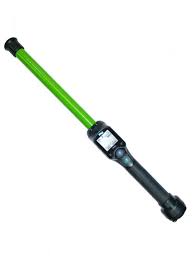
Part 1: Configure Required Settings
Bluetooth mode
- Navigate to Settings > Bluetooth on the RS420.
- Confirm the reader is set to Slave Mode or standard pairing mode (not a closed/proprietary mode).
Part 2: Pair in Phone Bluetooth Settings
On iPhone or iPad:
- Power on the RS420.
- Open Settings > Bluetooth on your iPhone or iPad.
- The RS420 appears in available devices & tap it to pair.
- It shows as Connected when successful.
On Android:
- Power on the RS420.
- Open Settings > Connected devices > Bluetooth.
- The RS420 appears in available devices & tap it.
- It shows as Paired when successful.
Part 3: Connect in Breedr
- Open the Breedr app and tap the Bluetooth icon in the top right corner.
- The RS420 appears in the device list & tap it to connect.
- The Bluetooth icon turns green when connected.
Part 4: Scan EID Tags in a Chute Session
- Start a Quick Weigh or Quick Scan session.
- Press the Read button on the RS420 and point at the animal's EID tag.
- The EID populates on screen automatically.
Test before your session. Use the Device Tester Screen to confirm EIDs are reading correctly. See Device Tester Screen.
Troubleshooting:
|
Problem |
Fix |
|
RS420 not in Breedr device list |
Confirm paired in phone Settings > Bluetooth first |
|
EIDs have a space in the middle |
Set tag format to Decimal 2 (Part 1) |
|
Drops connection mid-session |
Check battery, stay within 30 feet |
|
RS420 reconnects to old device instead of phone |
Remove old device pairing from RS420 Bluetooth settings, re-pair to phone |
See Issues Connecting Your Breedr App to Your Equipment? for further help.
Need some help?
Use the chat window, call (737) 412-3131, or email supportUSA@breedr.co.