
Tags can be found on the mobile app and web portal via the 'Tags' tab on the 'My Cattle' pages.
Tip: Some users use tags to track their suppliers, invoice numbers, program cattle, to retain/to harvest and specific breeding classifications.
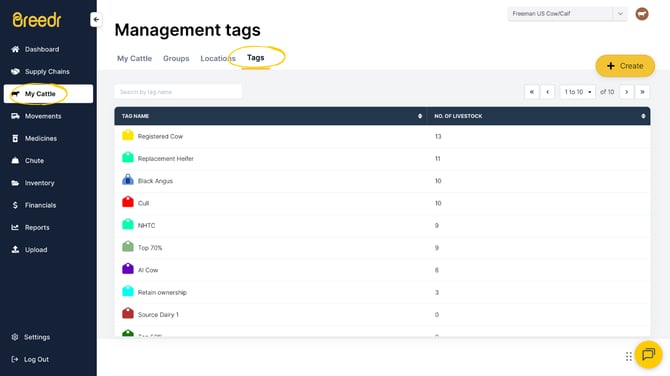

Step-by-Step: To Create a Tag
Mobile and Web
-
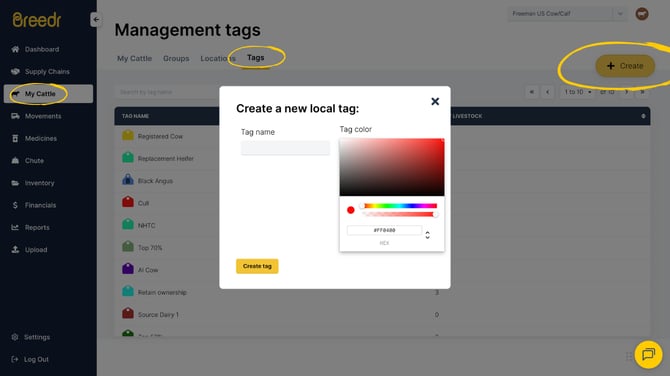
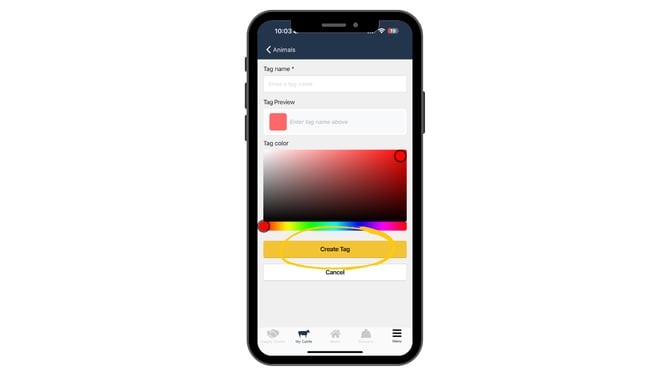
Click the yellow '+ Create' button. You will be prompted to enter a name and select a color for the Tag.
-
Click 'Create Tag' and you're good to go.
.png?width=670&height=377&name=Guides%20Templates%20(12).png)
.png?width=670&height=377&name=Guides%20Templates%20(13).png)
Step-by-Step: To edit or delete a Tag
Mobile
-
Click on the Tag you want to edit or delete, then click the yellow '+ Manage' button on the bottom right of the screen.
-
Click the 'Edit tag' option in the menu. From here, you can change the name and adjust the color of the Tag.
-
To save, click 'Update Tag' and to delete, click the red 'Delete Tag' text below the 'Cancel' button.
.png?width=670&height=377&name=Guides%20Templates%20(9).png)
Web
-
Click on the Tag you need to change, edit or delete.
-
From here, use 'Edit Tag' 'Manage Tag' 'or 'Delete Tag' as needed.

.png?width=670&height=377&name=Guides%20Templates%20(11).png)
Need some help?
Use the chat window, call our Customer Success team at +1 (833) 980-1926, or email support supportusa@breedr.co