
The Breedr app is available to download on both iOS and Android devices.
If you have an iOS/Apple device, open the App Store and search for ‘Breedr Livestock’ to download the app, or scan the QR code below.

If you have an Android/Google device, open the Google Play Store and search for ‘Breedr Livestock’ to download the app, or scan the QR code below.
*Note: To scan these QR codes with your mobile device, open your camera app and point it at the QR code. A yellow link/icon will appear at the bottom of your screen—click it to be taken directly to the app store.
Follow the steps below to download the Breedr app to your mobile device.
-1.png?width=670&height=377&name=Guides%20Templates%20(1)-1.png)
Once the Breedr app has been installed on your device, open the app, and login with the username and password you created when you signed up for an account.
.png?width=670&height=377&name=Guides%20Templates%20(6).png)
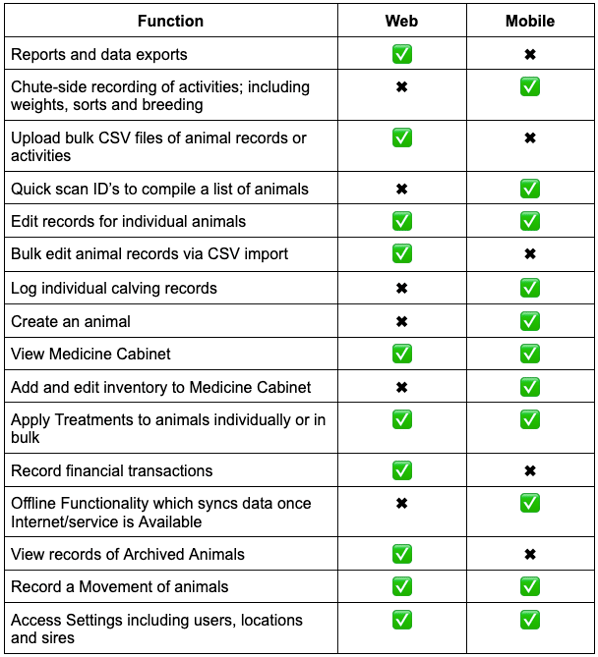
Some tools and features are only available in the Breedr mobile app
Need some help?
Use the chat window, call our Customer Success team at (737) 412-3131 or email support supportusa@breedr.co