
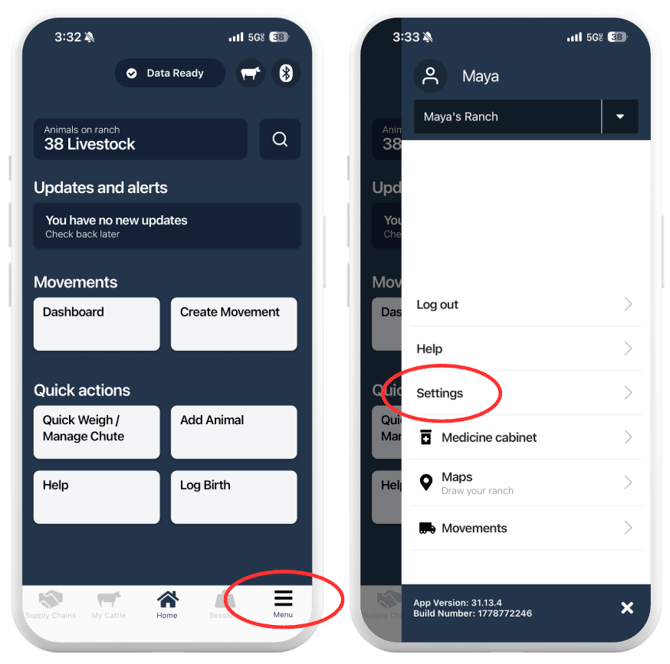
How to Access General Settings:
- Tap "Menu" in the bottom right corner of the app.
- Tap "Settings."
- Tap "General Settings."
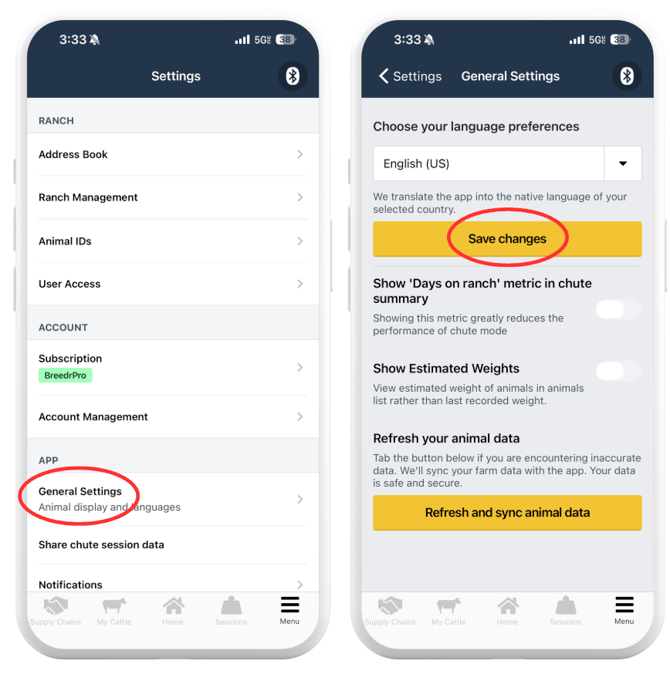
Settings Available:
Language Preferences
Select the language the app displays in. Breedr translates the app into the native language of your selected country.
- Tap the language dropdown.
- Select your preferred language.
- Tap "Save Changes."
US accounts default to English (US).
Show 'Days on Ranch' Metric in Chute Summary:
Toggle this on to display the number of days each animal has been on the ranch in the chute session summary screen.
This toggle is off by default. The app itself notes that showing this metric greatly reduces the performance of Chute Mode. Keep it off unless you specifically need to see days on ranch during a session. If Chute Mode feels slow, check this toggle is off.
Show Estimated Weights:
Toggle this on to display an estimated current weight on each animal's record in My Cattle, calculated from the animal's weight history and ADWG.
This toggle is off by default. When off, the animal list shows the last recorded weight instead.
Turn this on if you want a projected current weight between weigh sessions. Turn it off if you only want to display actual recorded weights.
Refresh Your Animal Data:
Tap "Refresh and Sync Animal Data" if your animal records look out of date or are showing inaccurate data. This forces a full sync between the app and your account data.
Use this if:
- Animals you added recently are not appearing in My Cattle
- Data looks different from what you see on the browser portal
- You have been offline and want to confirm everything has synced correctly
Your data is not affected by this action, it only pulls the latest information from the server to your device.
Need some help?
Use the chat window in the bottom right of the screen, call our Customer Success team at (737) 412-3131, or email us at supportusa@breedr.co.