
What You Can Delete Yourself:
The following activity types can be deleted without contacting support:
- Treatments and medicines
- Weights
- Notes
- Financial records (purchase price, sale price)
- Breeding activities (pregnancy checks, AI, servicing, estrus, weaning)
- Genetic evaluation records
- Performance records (BCS, foot score, docility, etc.)
What requires Customer Success to delete, please contact our team to delete any of the following:
- Off Movements
- Birth records
- Death records (Mark as Dead)
These affect inventory counts, report totals, and historical data integrity, so they cannot be self-deleted. Have the animal's Visual ID or EID ready when you get in touch.
Delete an Activity on the App:
- Find the animal in My Cattle and tap its record to open it.
- Scroll to the activity history section.
- Find the activity you want to delete.
- Swipe left on the activity row.
- A delete option appears. Tap it to confirm deletion.
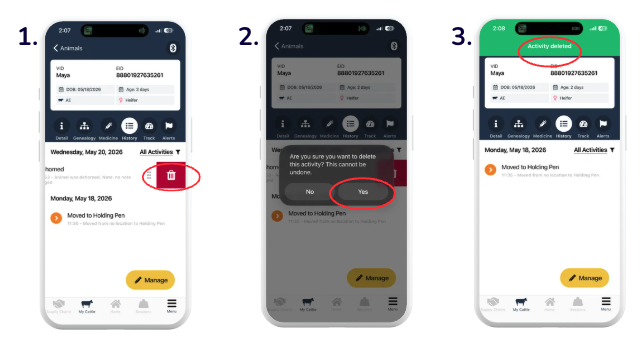
The activity is removed from the animal's history immediately.
Delete an Activity on the Browser:
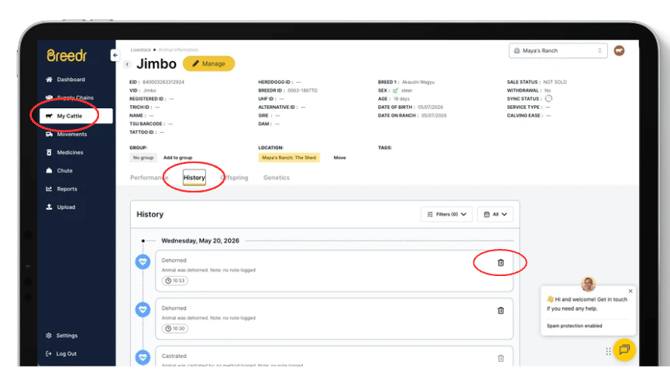
- Open the animal's record from My Cattle.
- Find the activity in the animal's activity history timeline.
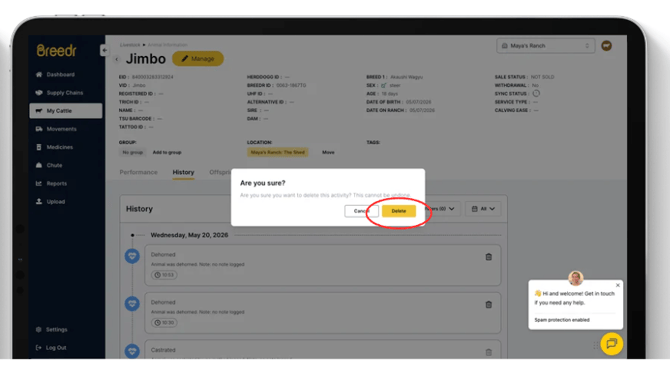
- Click the delete icon next to the activity.
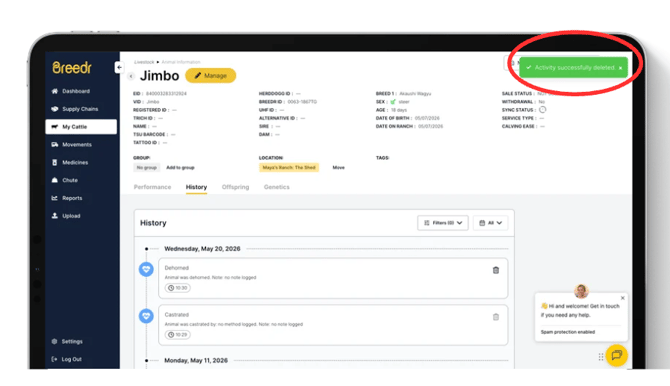
- Confirm the deletion.
- Green "Activity Successfully Deleted" banner confirms deletion was successful.
Delete Activities in Bulk:
To delete the same activity type across multiple animals, contact our Customer Success team. Bulk deletions cannot be done self-serve through the app or browser portal.
Need some help?
Use the chat window in the bottom right of the screen, call our Customer Success team at (737) 412-3131, or email us at supportusa@breedr.co.