
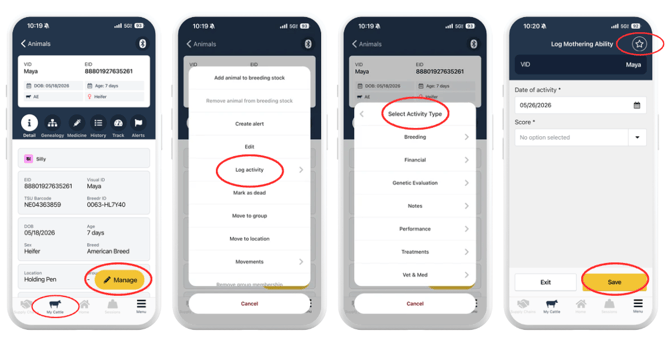
- Find any animal in My Cattle and tap its record.
- Tap the yellow "+ Manage" button.
- Tap "Log activity."
- The activity selection screen opens. Find the activity you want to favorite.
- Tap the star icon in the upper right corner of the activity row.
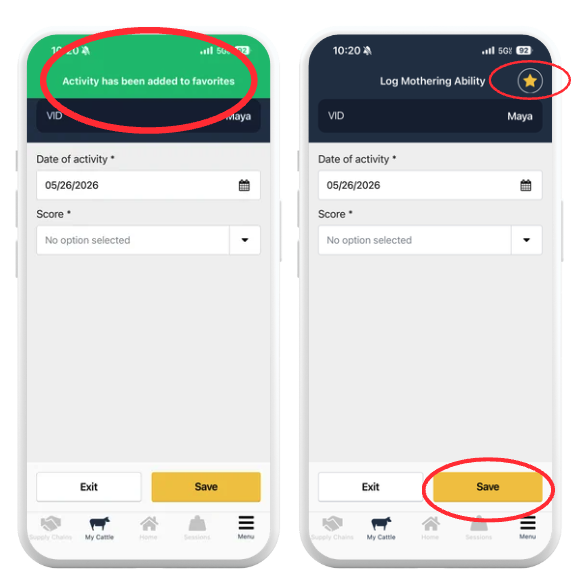
- The star turns gold to confirm the activity is now a favorite.
Favorited activities move to the top of the activity list under a "Favorites" section so they are always the first options you see.
Favorite an Activity From Within a Chute Session:
You can also mark favorites without leaving an active session:
- During a chute session, tap "+ Manage" after scanning an animal.
- Tap "Log activity."
- Tap the star icon next to the activity you want to favorite.
The favorite is saved immediately and applies to all future sessions and activity logging across your account.
Remove a Favorite:
To remove an activity from your favorites:
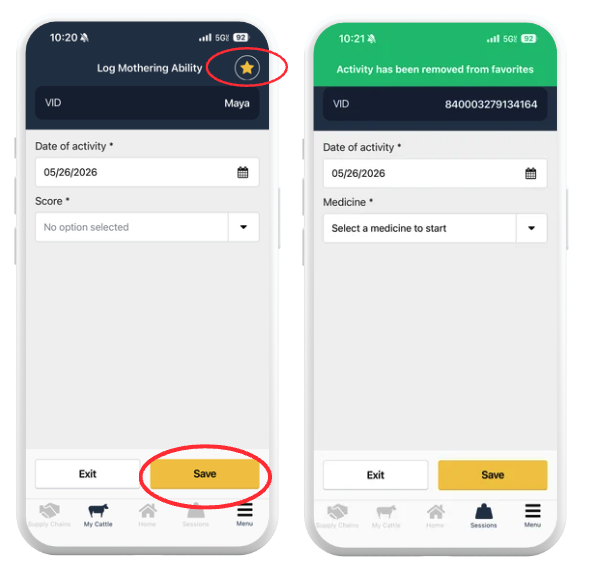
- Open the activity selection screen via "+ Manage" > "Log activity" from any animal record.
- Find the activity in the Favorites section at the top of the list.
- Tap the gold star icon to deselect it.
- The activity returns to its standard position in the list.
Favorites Apply Across Your Mobile Account
Favorites are saved to your user profile and apply everywhere you log activities on your mobile device: in My Cattle, in chute sessions, and in bulk activity logging. They are not device-specific, so a favorite set on your phone will also appear when you use a tablet.
Need some help?
Use the chat window in the bottom right of the screen, call our Customer Success team at (737) 412-3131, or email us at supportusa@breedr.co.