
Before You Start:
- Your registered Charolais cattle must already be in Breedr before importing EPD data. The importer matches your AICA file to existing Breedr records using registration numbers.
- If your animals are not yet in Breedr, add them first. See Add Animals via File Import.
- Confirm your animals have their AICA registration numbers recorded in Breedr.
Step 1: Download your EPD file from AICA
- Log in to your AICA member account at charolaisusa.com.
- Navigate to your herd records or EPD data section.
- Download your EPD file containing your registered animals' current EPDs and performance data.
Questions about your EPD file? Contact AICA directly at charolaisusa.com or call AICA member services.
Step 2: Import into Breedr
- Log in at app.breedr.tech on your browser.
- Go to Upload from the left-hand navigation.
- Select "Partner Import."
- Select "Breed Association EPDs"
- Select "American Charolais"
- Select your downloaded AICA file and click "Upload File"
- Map the columns. Confirm the registration number column is mapped so Breedr can match each row to the correct animal.
- Click "Finish Upload."
- A green screen confirms the import was successful.
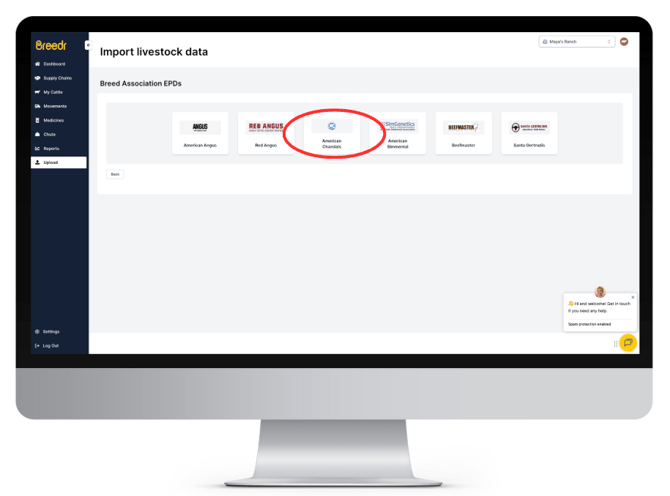
Step 3: Verify the Data on an Animal Record
- Open any registered animal in My Cattle.
- Confirm EPD data appears on the animal's record.
- If data is missing, confirm the animal has a matching registration number in both Breedr and the AICA file.
If your Import has Errors:
|
Error |
Likely cause |
Fix |
|
Animal not found |
Registration number in the AICA file does not match any animal in Breedr |
Add the registration number to the animal's record in Breedr, then re-import |
|
Invalid file format |
File was modified before importing |
Download a fresh copy from AICA and import without opening it first |
Need some help?
Use the chat window in the bottom right of the screen, call our Customer Success team at (737) 412-3131, or email us at supportusa@breedr.co.