
Are you an RAAA Angus Access member? Breedr is complimentary for Angus Access-enrolled producers. See I'm with RAAA for enrollment details before starting this import.
Before You Start:
- Your registered cattle must already be in Breedr as animal records before importing EPD data. The importer matches rows in your RAAA file to existing Breedr records using registration numbers.
- If your animals are not yet in Breedr, add them first. See Add Animals via File Import.
- Confirm your animals have their RAAA registration numbers recorded in Breedr. The import matches on registration number, animals without one will not match.
Step 1: Download your EPD file from RAAA
RAAA members can download their own EPD file directly.
- Log in to your RAAA member account at redangus.org.
- Navigate to your herd records or genetic data section.
- Download your EPD file, this contains your registered animals' current EPDs, adjusted weights, and performance data.
Questions about downloading your file?
Contact RAAA: email info@redangus.org or call (940) 387-3502.
Step 2: Import into Breedr
Use this template for an easier uploading experience: Red Angus Association EPD Upload Template
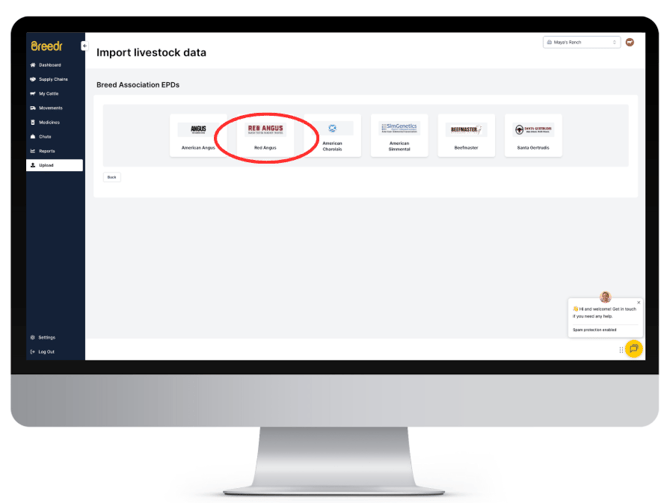
- Go to Upload from the left-hand navigation.
- Select "Partner Import."
- Select "Red Angus Association"
- Select your downloaded RAAA file and click "Upload File"
- Match the columns. Breedr will attempt to auto-match RAAA column headings. Confirm the registration number column is mapped, this is how Breedr identifies which animal each row belongs to.
- Click "Finish Upload."
- A green screen confirms the import was successful.
Step 3: Verify the Data on an Animal Record
- Open any registered animal's record in My Cattle.
- Confirm EPD data appears on the record, traits such as birth weight EPD, weaning weight EPD, yearling weight EPD, milk, and any RAAA economic indexes should be visible.
- If data is missing for an animal, confirm that animal has a matching registration number in both Breedr and the RAAA file.
How often to re-import: RAAA EPDs are recalculated periodically as new data is added to the national genetic evaluation. Re-import your RAAA EPD file after each national EPD release to keep your animals' genetic data current in Breedr.
If your Import has Errors:
Click "Download un-imported animals" to save a CSV of the rows that failed.
|
Error |
Likely cause |
Fix |
|
Animal not found |
Registration number in the RAAA file does not match any animal in Breedr |
Add the registration number to the animal's record in Breedr, then re-import |
|
Duplicate match |
Two animals in Breedr share the same registration number |
Resolve the duplicate before re-importing |
|
Invalid file format |
The RAAA file was modified or opened and re-saved before importing |
Download a fresh copy of the file from RAAA and import without opening it first |
Need some help?
Use the chat window in the bottom right of the screen, call our Customer Success team at (737) 412-3131, or email us at supportusa@breedr.co.