
The Breeding Stock tab is located under the My Cattle page, then Breeding Stock tab.
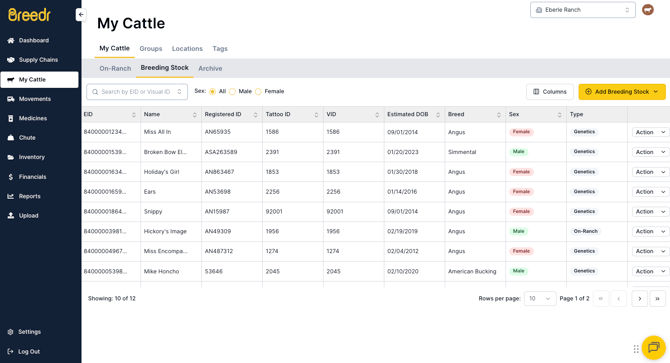
You can add new animals to your Breeding Stock list in 3 ways - via CSV import, adding manually on the web or mobile app or assigning a live animal as a Breeding Stock designation. It's critical to assign an on ranch animal as breeding stock to show up in the list to assign a dam or sire to an offspring animal.
Assign On Ranch Animal as Breeding Stock on Web
- Ensure the animal exists on your On-Ranch list.
- Go to the Breeding Stock tab.
- On the web, click the yellow '+ Add Breeding Stock' button.
- Click the option to 'Assign On-Ranch Animal'
- A pop up window will appear with a search box.
- Use the search box to enter either EID, VID, or Name to find the animal from your On-Ranch inventory.
- Check the box next to the appropriate animal.
- Once all are selected, click blue button to 'Mark as Breeding Stock'.
Add Individual Breeding Stock Animal on Web and Mobile
- Go to Breeding Stock tab.
- On the web, click the yellow '+ Add Breeding Stock' button. On the mobile app, click the yellow '+ Manage' button
- Click the option to 'Create Off-Ranch Genetics'
- Fill out as much information as you have on the next screen.
- Once done, hit yellow 'Create' on web or 'Save' button on mobile.
Bulk Add Genetic Animals via CSV Import
- If you have a spreadsheet of historic breeding stock animals that you'd like to bulk add, you can use one of our custom importers.
- Go to the Upload menu, then click Custom Import then Breeding. Select the 'Genetic Animal' option.
- Turn your spreadsheet into a .csv file
- Upload the .csv file after clicking 'Upload file' button
- Use the drop down menus on the right side to select what ID you are using to create the new animal with.
- For example, if you are adding a Genetic Sire with a Name, select the Name option under the Genetic Sire ID Type.
- Then when matching the columns, select the column Genetic Sire where you have all the names listed.
- Add the remaining information you'd like to include.
- Hit 'Finish upload'