
What the statuses mean:
|
Status |
What it means |
Where it appears |
|
On Ranch |
The animal is currently at your ranch and part of your active herd |
My Cattle - App & Web, Reports, Geneology |
|
Archived |
The animal has left the ranch or is no longer active: sold, died, moved off |
My Cattle - Web only, Reports, Geneology |
An animal moves from On Ranch to Archived when you record one of the following activities:
- Off Movement -- the animal has been sold or moved to another location
- Mark as Dead -- the animal has died
- Move Animals Off -- bulk move-off via CSV or session
Archived animals are never deleted. Their full history, weights, activities, treatments, breeding records, is retained and accessible at any time.
Viewing On Ranch Animals:
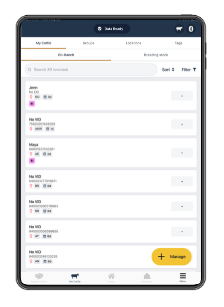
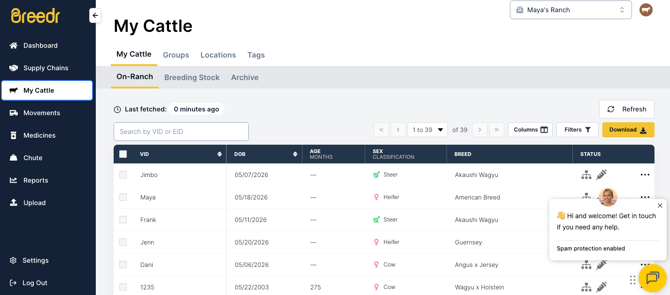
On Ranch is the default view when you open My Cattle. All animals with an active status on your account appear here.
On the app:
- Tap "My Cattle" from the bottom navigation bar.
- The "On Ranch" tab is selected by default.
On the browser portal:
- Select "My Cattle" from the left-hand navigation.
- The On Ranch view loads by default.
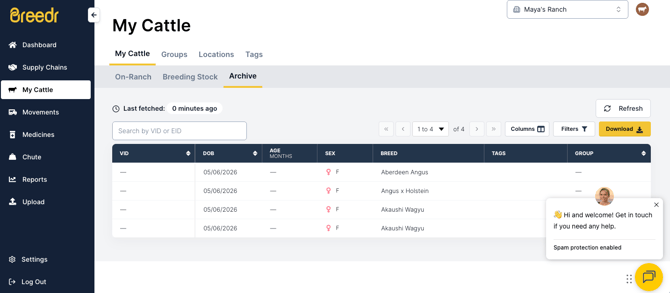
Viewing Archived Animals:
On the browser portal:
- Go to My Cattle.
- Use the status filter to select "Archived."
Accessing an archived animal's record:
Archived animals retain their full history. To view an individual archived animal's record:
- Filter My Cattle to show Archived animals.
- Tap or click the animal to open its record.
- All activities, weights, treatments, and breeding records are visible exactly as they were when the animal was active.
What happens to archived animals in reports:
Archived animals remain included in historical report data. For example:
- Medicine Record -- shows all treatments administered to archived animals during the time they were on ranch
- Breeding History -- shows all breeding activity for archived animals
- Inventory and Movements -- includes off movements that changed the animal's status to Archived
- Sessions -- sessions containing archived animals are still visible in full
Active reports like On Ranch Weights and Animal Forecast only include On Ranch animals.
Can an archived animal be returned to On Ranch?
Yes. If an animal was archived by mistake, or if an animal returns to your ranch, contact our Customer Success team and we can restore the animal to On Ranch status.
- Chat: Chat window in the bottom right of the screen
- Phone: (737) 412-3131
- Email: supportusa@breedr.co
Common Questions:
I sold an animal but it is still showing as On Ranch. What do I do?
Record an Off Movement for the animal. This changes its status to Archived and records the sale or transfer correctly. See Off Movements for steps.
An animal died but it is still in My Cattle.
Record the death using Mark as Dead. This archives the animal and adds a death record to its history. See Mark an Animal as Dead.
I accidentally archived an animal.
Contact our Customer Success team to restore it. Have the animal's Visual ID or EID ready when you get in touch.
Do archived animals count toward my subscription?
Contact our Customer Success team for details on how archived animals are counted on your specific plan.
Need some help?
Use the chat window in the bottom right of the screen, call our Customer Success team at (737) 412-3131, or email us at supportusa@breedr.co.