
The hierarchy in Breedr looks like this:
Unit (e.g. "Home Ranch") contains Locations (e.g. "South Pasture," "Trap Pen," "Weaning Pen") which contain Animals
Units appear as a filter option in both the My Cattle table and the Locations tab, letting you view all animals across every location in that Unit at the same time.
Important: plan your Units before adding animals
The Unit field on a Location is locked for editing once animals are assigned to that Location. If you open a Location that has animals in it and try to change its Unit, the Unit field will be greyed out.
Set up your Units first. Next, create your Locations, assigning each one to the correct Unit before adding any animals. If you need to move a Location to a different Unit after animals are already there, follow the holding pen workflow below.
Create a Unit
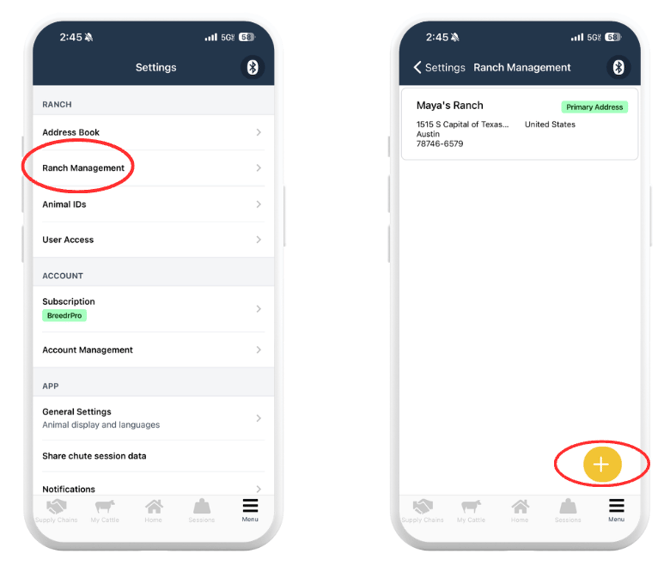
Units are created in Ranch Management in Settings, not from within My Cattle.
- Tap "Menu" in the bottom right corner of the app.
- Tap "Settings."
- Tap "Ranch Management."
- Tap "Units" or "Manage Units."
- Tap "Add Unit."
- Enter a name for the Unit (e.g. "Home Ranch," "North Division," "Summer Lease").
- Tap "Save."
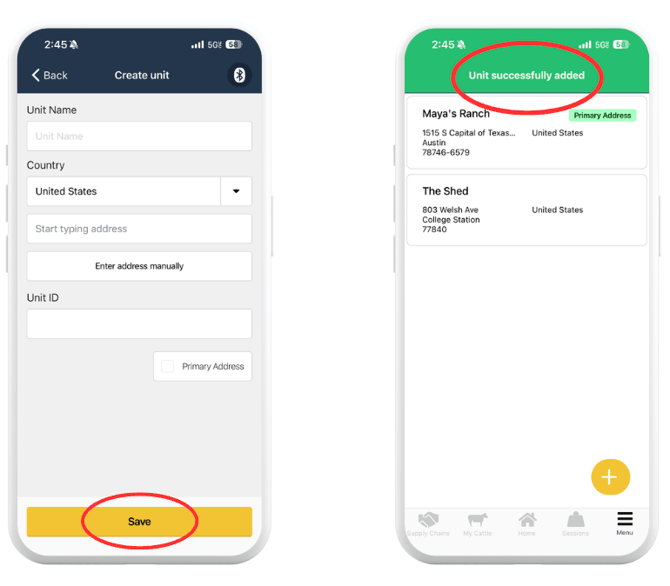
Once your Units are created, set up your Locations and assign each one to the correct Unit. See Create, Edit and Delete a Location.
View Animals by Unit:
Once animals are in Locations that belong to a Unit, filter your cattle list by Unit to see them all at once.
- Tap "My Cattle" from the bottom navigation bar.
- Tap "Locations" at the top of the animal list.
- Tap the Unit you want to view.
- All animals across every Location in that Unit appear in the list.
Why the Unit Field is Greyed Out on a Location:
When you open a Location to edit it, the Unit field will be greyed out if that Location currently has animals in it. This is by design, Breedr prevents you from changing a Location's Unit while animals are assigned to it to protect the integrity of your location and movement records.
To change which Unit a Location belongs to, you first need to move all animals out of it.
How to Move a Location to a Different Unit:
Follow these steps when you need to reassign a Location to a different Unit but it currently has animals in it.
Step 1: Move all Animals out of the Location
Move every animal from the Location to a temporary holding pen or any other Location that is not being changed.
- Go to My Cattle and filter by the Location you want to reassign.
- Tap "Select all" to select every animal in that Location.
- Tap "Manage" then "Move to Location."
- Select a holding pen or temporary Location as the destination.
- Tap "Save."
No holding pen set up yet? Create a temporary Location first. Go to My Cattle > Locations, tap "+ Create," name it "Holding Pen" or similar, assign it to any Unit, and save. Move your animals there, then come back to reassign the original Location.
Step 2: Edit the Location's Unit
With no animals in the Location, the Unit field is now editable.
- Go to My Cattle > Locations.
- Tap the Location you want to reassign.
- Tap the Unit field, it is now active and selectable.
- Choose the correct Unit from the list.
- Tap "Save."
Step 3: Move Animals Back Into the Location
Now that the Location is in the correct Unit, move your animals back from the holding pen.
- Go to My Cattle and filter by the holding pen Location.
- Select all animals.
- Tap "Manage" then "Move to Location."
- Select the reassigned Location as the destination.
- Tap "Save."
Units vs Groups vs Locations, What is the Difference?
| Feature | What it is | How it is Used |
|---|---|---|
| Unit | A named group of Locations | Organises your ranch into sections. Filter all cattle in a section at once. |
| Location | A specific field, pen, or pasture | Tracks exactly where an animal is on the ranch. An animal is assigned to one Location at a time. |
| Group | A label applied to animals directly | Organises animals by a characteristic or management decision (e.g. "Sell Fall," "Replacement Heifers"). An animal can be in a Group and a Location at the same time. |
Need some help?
Use the chat window in the bottom right of the screen, call our Customer Success team at (737) 412-3131, or email us at supportusa@breedr.co.