
Alerts recorded in Breedr will appear for all account users in the dashboard of their mobile app under 'All updates and alerts', as well as against the individual animal.
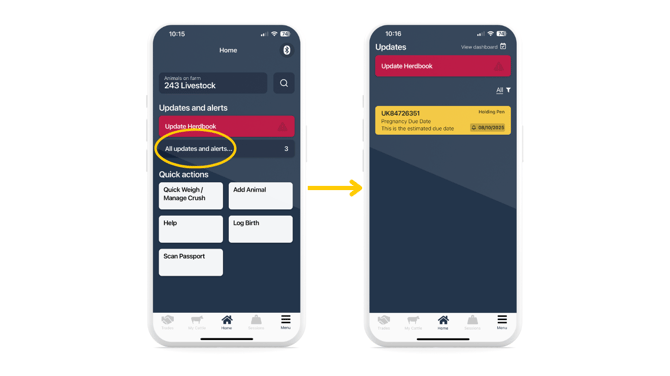
Top Tip: Ensure your phone settings allow notifications for the Breedr app so you can receive a push notification without even opening the app.
Create an alert against an individual animal:
- Head to 'My Cattle' and select the animal you wish to create an alert for.
- Click on the 'Alerts' tab to see all alerts currently against this animal.
- 'Manage'.
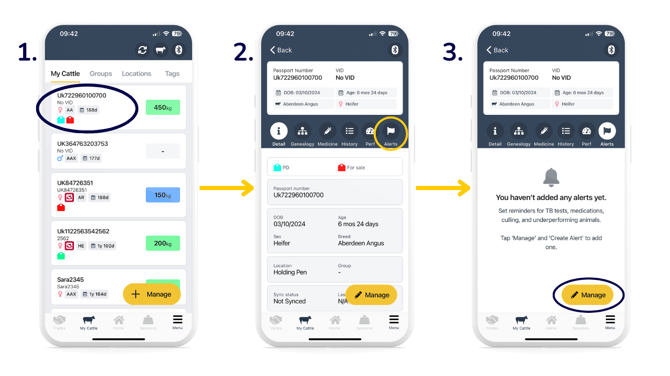
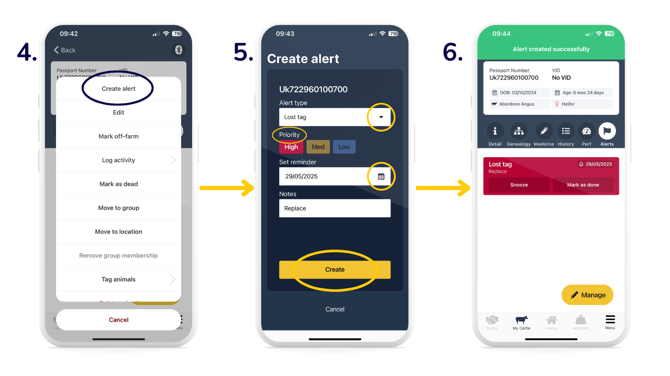
- 'Create alert'.
- Select the 'Alert type', 'Priority', set the date of the reminder, and optionally add any notes > 'Create'.
-
You will then see a green 'Alert saved successfully' banner. Alert details will sit against the individual animal, as well as being displayed in the 'All updates and alerts' section in the dashboard.
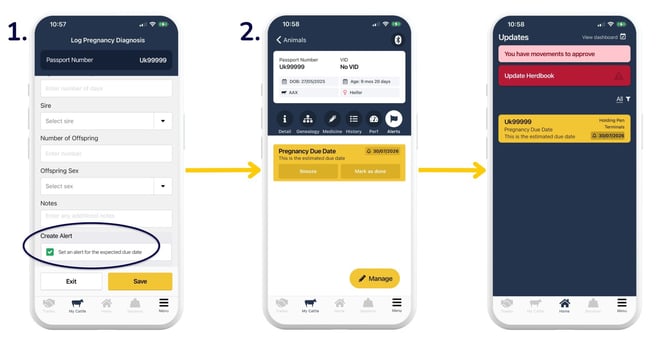
Automatically create an alert when logging a PD test:
- When logging a PD test, you will see a tickbox to 'Set an alert for the expected due date'. An alert will be automatically created, estimating the pregnancy due date according to your 'Days Since Conception' entry. This tickbox will be automatically ticked, but if you do not wish to create an alert, you can untick the box before hitting 'Save'.
- Alert details will sit against the individual animal, as well as being displayed in the 'All updates and alerts' section in the dashboard.
Create an alert in Quick Weigh:
You can create an alert against an animal during a weigh session in Breedr. Click 'alert' by the animal passport number, add in the required details, then click 'Create'. You will then see the animal marked with the flag icon, where you can create more alerts, if required.
Top Tip: You can find all previous and current alerts in the Alerts report in the web app. Here, you can filter by date and specific animal/s.
Relevant articles:
Record a note against your animals in Breedr
Deleting activities on the mobile and web app
Overview of logging activities against animals
Mobile app and web app overview
Need some help? Use the chat window to your right on the web or the help button on your mobile app, call our Customer Support team on +44 (0) 3300 436327 or email support@breedr.co.