
Logging an activity in Breedr means recording events against animals, such as movements, medicine applications and weights. There are many areas where you can log an activity in the mobile app: in the 'My Cattle' page, in 'Groups/Locations', in 'Quick Weigh', in 'Finished Sessions', or in 'Scan List'.
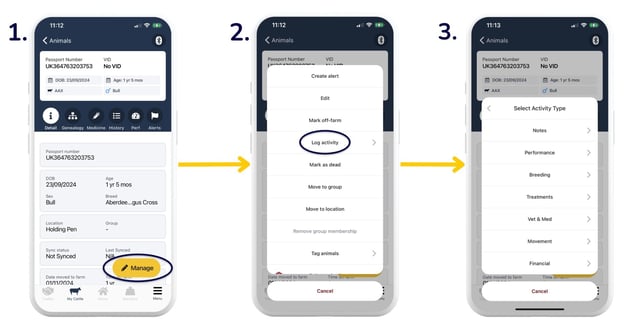
Log an activity against an individual animal:
- Head to 'My Cattle' > tap on an animal you want to apply the activity to > 'Manage'.
- Select a listed activity, or find more options under 'Log activity'.
- Select the required activity.
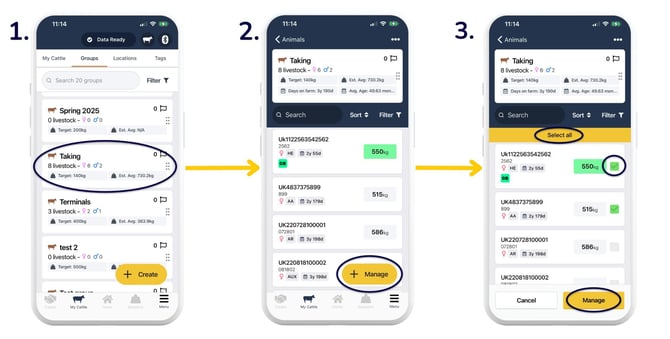
Log an activity against a group/location:
- Head to 'Groups' or 'Locations' and tap on the group/location that you want to apply the activity to.
- Tap 'Manage'.
- Either 'Select all' or tick the boxes to the right of the individual animals > 'Manage'.
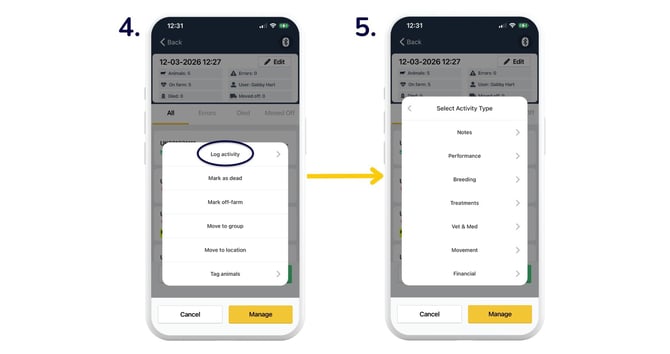
- Select a listed activity, or find more options under 'Log activity'.
- Select the required activity.
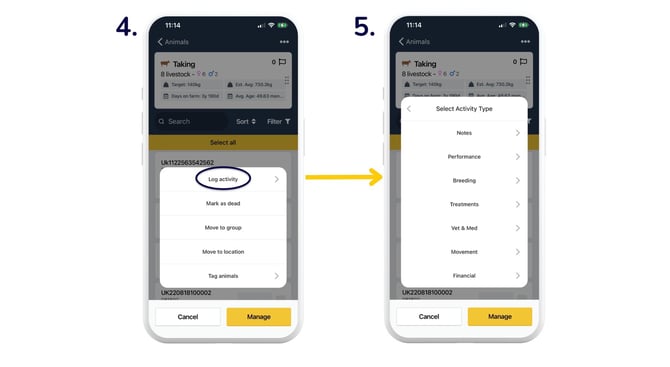
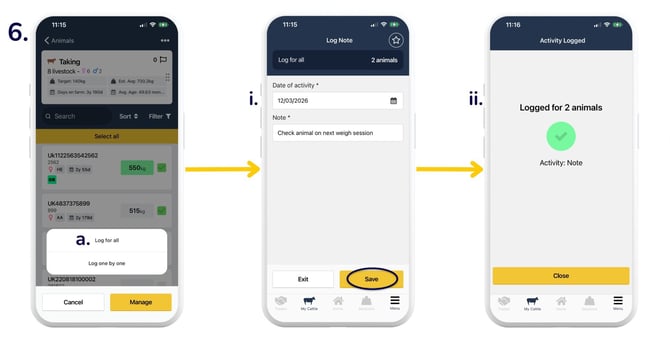
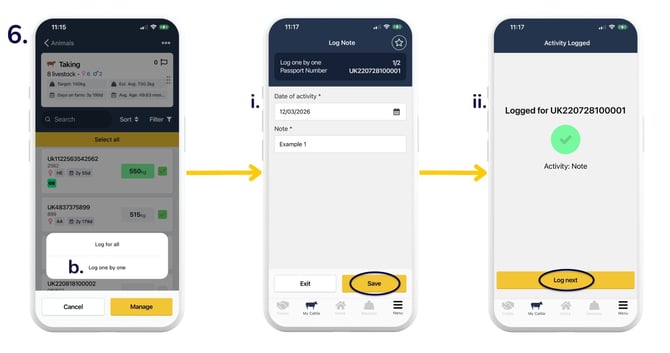
- You will then be asked whether you want to:
- 'Log for all' - record the same activity details against all animals selected.
- Fill out the activity details > 'Save'.
- You will then see this screen confirming you've logged the activity against all animals selected.
- 'Log one by one' - record different activity details against each animal selected.
- Fill out the activity details for the individual animal > 'Save'.
- You will then see this screen confirming you've logged the activity against that individual animal > 'Log next'. Continue until you have individually logged activity details for all animals selected.
- 'Log for all' - record the same activity details against all animals selected.
Log an activity against an individual animal in Quick Weigh:
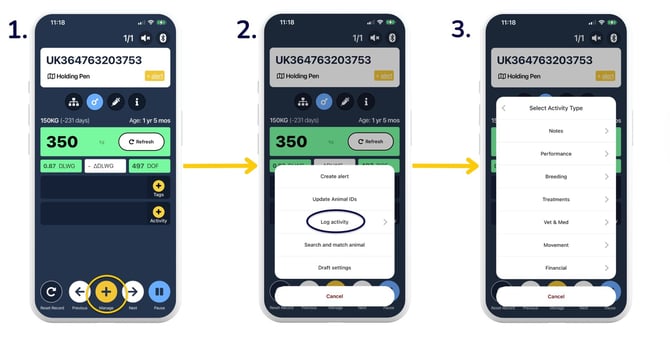
- When weighing an animal, select 'Manage'.
- Select a listed activity, or find more options under 'Log activity'.
- Select the required activity.
Log an activity against animals in Finished Sessions:
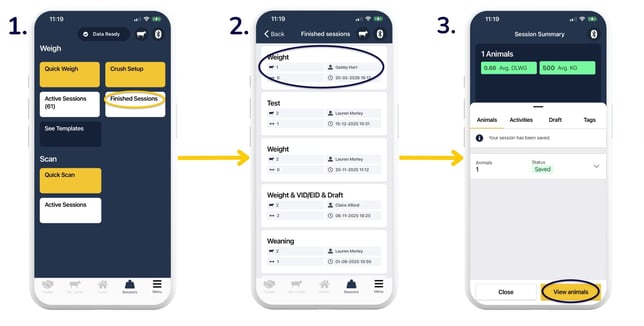
- Click on 'Finished Sessions'.
- Select the session that you want to apply the activity to.
- Click 'View animals'.
- 'Manage'.
- Either 'Select all' or tick the boxes to the right of the individual animals > 'Manage'.
- Select a listed activity, or find more options under 'Log activity'.
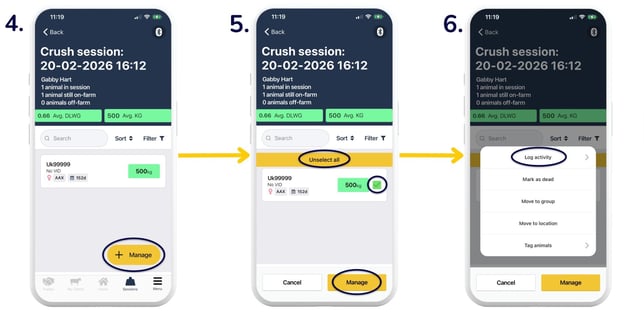
- Select the required activity, and choose whether to 'Log for all' or 'Log one by one'.
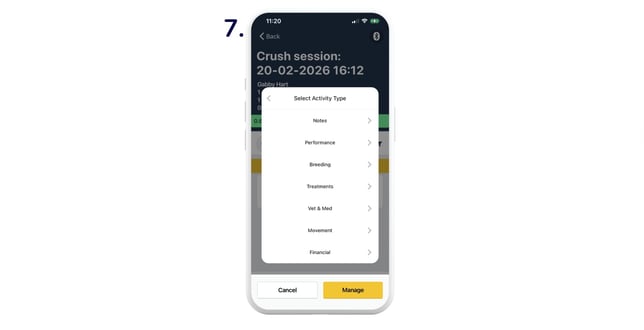
Log an activity against animals in Scan List:
- Click 'Scan List'.
- Once you've scanned your animals, tap 'Stop/Save'.
- 'Manage'.
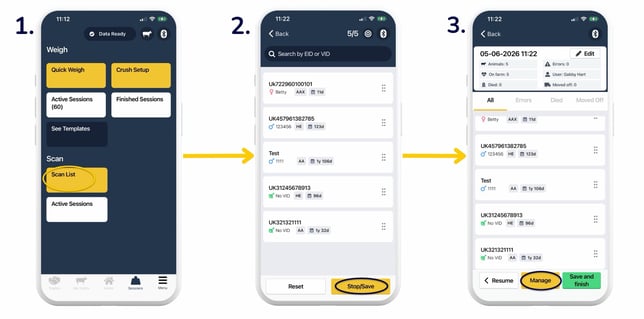
- Select a listed activity, or find more options under 'Log activity'.
- Select the required activity, and choose whether to 'Log for all' or 'Log one by one'.
Top Tip: Head to the 'Reports' section in the web app to view various insights from your logged activities.
Relevant articles:
Deleting activities on the mobile and web app
Record vet & med activities in Breedr
Update EIDs and/or VIDs via CSV import
Need some help? Use the chat window to your right on the web or the help button on your mobile app, call our Customer Support team on +44 (0) 3300 436327 or email support@breedr.co.