
In the mobile app, you can edit an individual animal to update the Electronic ID (EID) or Visual ID (VID). On the web app, you can also edit an individual animal to update the EID/VID, or you can update multiple IDs through the CSV upload.
To update the VID and/or EID number against an animal in the mobile app:
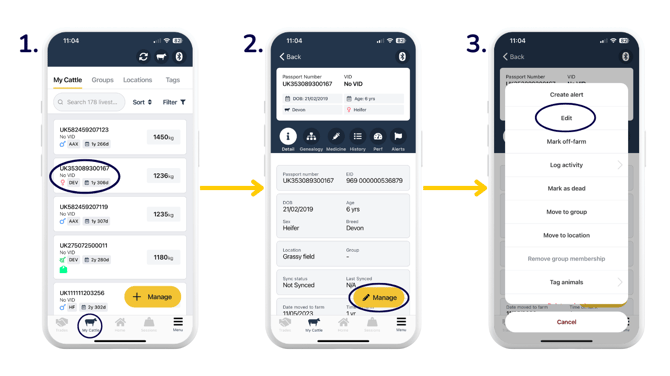
- Head to the 'My Cattle' tab, then click on the animal you want to edit the details of.
- 'Manage'.
- 'Edit'.
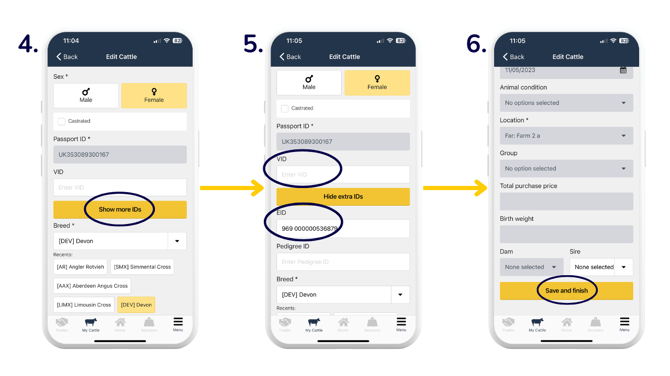
- Edit VID and/or 'Show more IDs' for more options.
- Once 'Show more IDs' is selected, the EID field displays. You can type in the new/updated ID number.
- 'Save and finish'.
To update the VID and/or EID number against an animal in the web app:
From the 'My Cattle' tab > select an animal > click the yellow 'Manage' button.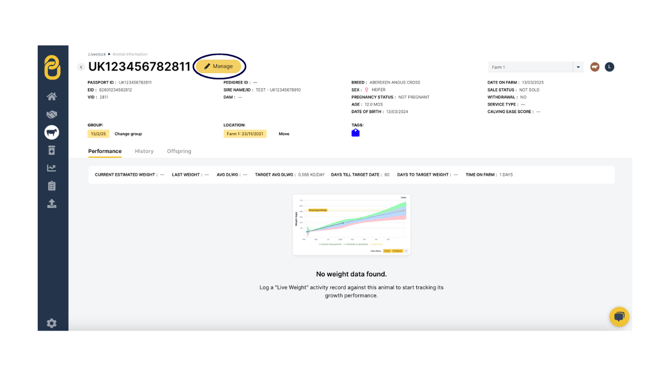
You can then edit the VID and/or EID fields > 'Save and finish'.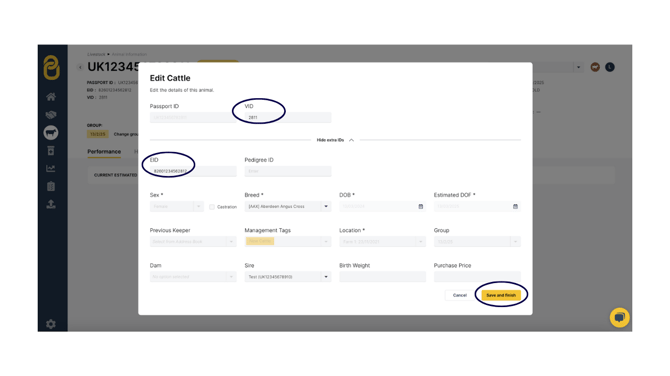
To update EIDs/VIDs via CSV upload, if you have multiple EIDs/VIDs to update:
- Go to your CSV upload page > 'Custom Import (.csv file)' > 'Edit Animals'.
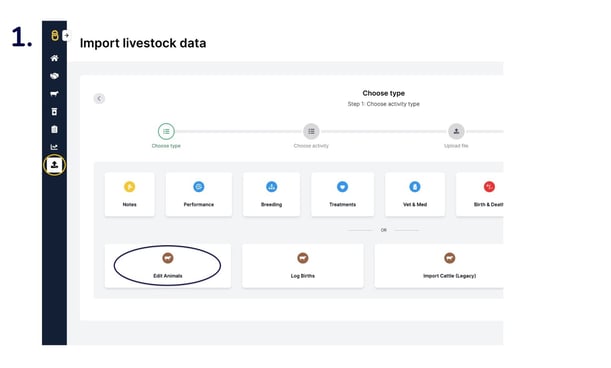
- 'Upload file' and then match the column headers to the data it is showing. Select 'IGNORE' in columns that you don't need to update (e.g. if you only need to update the Electronic ID, use the dropdown arrows on the Visual ID column and select 'IGNORE') > 'Finish upload'.
.png?width=670&height=377&name=csv%20upload%20(2).png)
Top Tip: You can also update EIDs/VIDs in Crush mode. Click here to find out more.
Relevant articles:
Scan passports and add animals via the mobile app
View animal information on your mobile app
Organise animals into groups and locations
Filtering animals on your mobile and web app
Need some help? Use the chat window to your right on the web or the help button on your mobile app, call our Customer Support team on +44 (0) 3300 436327 or email support@breedr.co.