
You can add as many users as you need and assign different permissions to control what access they have to your account. This should reflect their role on farm.
Please see the table below, which highlights the visibility and access of different user roles within the system.
| User |
Movements / Regulatory |
View animals in My Cattle | Log activities | View & download reports | Settings |
| Guest | Yes | Yes | Yes | Yes | Address Book, Sires List, Profile, Email, Password |
| Worker | Yes | Yes | Yes | Yes | Address Book, Sires List, Profile, Email, Password |
| Manager | Yes | Yes | Yes | Yes | Address Book, Animal IDs, Sires List, Profile, Email, Password |
| Admin | Yes | Yes | Yes | Yes | Address Book, Farm Management, User Access, Animal IDs, Sires List, Profile, Email, Password, Subscription |
Edit user roles:
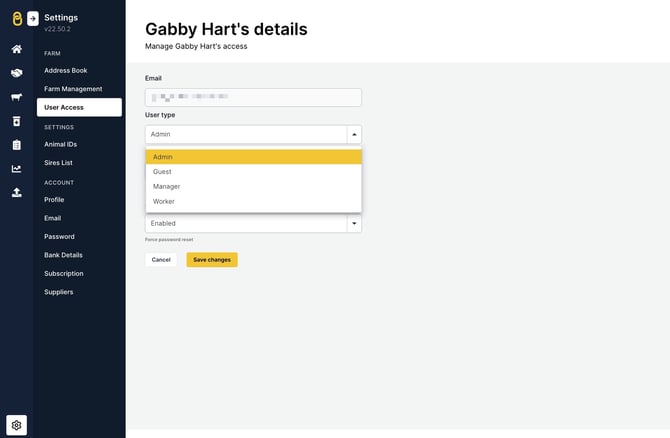
In the web app, head to 'Settings' > 'User Access' > click on the user > select the necessary role from the 'User type' dropdown > 'Save changes'.
Relevant articles:
Change my email address and/or password in Breedr
Add, edit or delete users in Breedr
Mobile app and web app overview
I can't log in to my Breedr account
Need some help? Use the chat window to your right on the web or the help button on your mobile app, call our Customer Support team on +44 (0) 3300 436327 or email support@breedr.co.