
Looking for personal preferences? Settings that apply only to you: language, estimated weights, and data sync are in General Settings. See General Settings.
How to Access Ranch Management:
On the app:
- Tap "Menu" in the bottom right corner.
- Tap "Settings."
- Tap "Ranch Management."
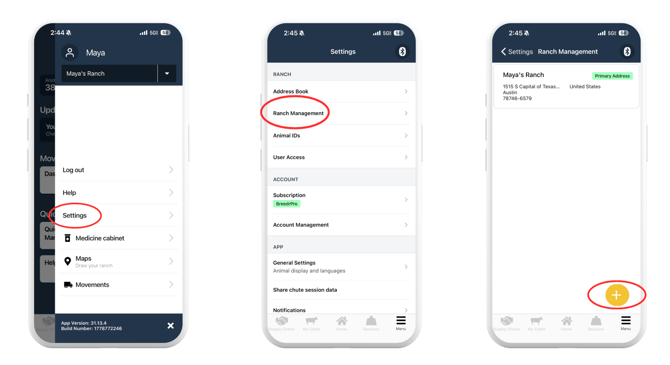
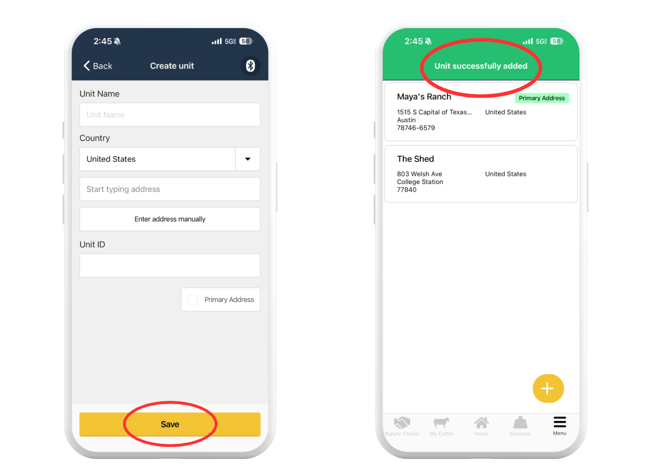
On the browser portal:
- Log in at app.breedr.tech.
- Select "Settings" from the left-hand navigation.
- Select "Ranch Management."
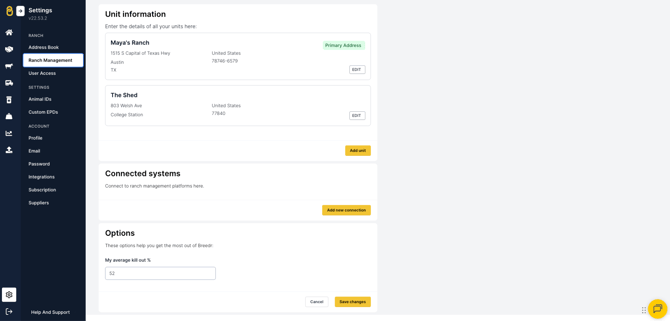
Settings available:
Ranch details
|
Setting |
What it controls |
|
Ranch name |
The name displayed across your account, reports, and animal records |
|
Address |
Your ranch address, used for regulatory and compliance purposes |
Multi-site accounts:
If your operation runs cattle across more than one location or business unit, Breedr can be configured to manage multiple sites under a single account. Contact our Customer Success team to set up or adjust multi-site configuration.
Need some help?
Use the chat window in the bottom right of the screen, call our Customer Success team at (737) 412-3131, or email us at supportusa@breedr.co.