
Top Tip: Anytime you see the yellow 'Manage' button in the app, you can record an activity. Click here to find out how to record an activity in Crush mode instead.
Record financial activities in the mobile app:
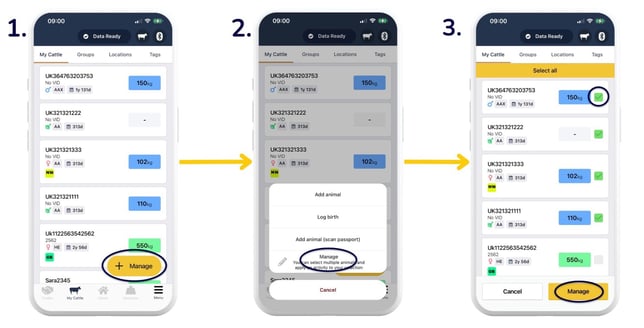
- Head to 'My Cattle' and select 'Manage' to select multiple animals to record activities against. If you'd like to add an activity to an individual animal, go straight to step 4.
- 'Manage'.
- Select animals by tapping the tickbox to the right of the animal/s. Select as many animals as required > 'Manage'.
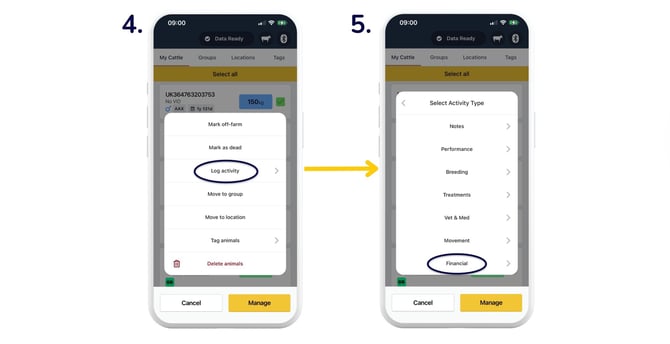
- 'Log activity'.
- 'Financial'.
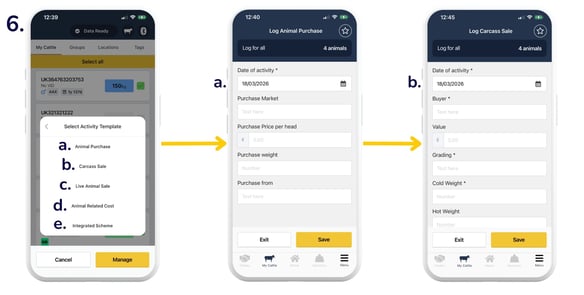
- You will then be asked whether you want to:
- Log 'Animal Purchase': select the 'Date', and optionally add the 'Purchase Market', 'Purchase Price per head' (in £), 'Purchase weight', 'Purchase from', and any notes > 'Save'.
- Log 'Carcass Sale': select the 'Date', 'Buyer', 'Grading', 'Cold Weight', 'Lot number', 'Kill number', and optionally fill out the other fields and add any notes > 'Save'.
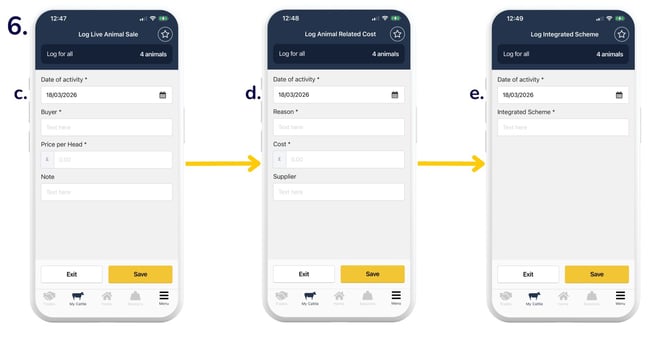
- Log 'Live Animal Sale': select the 'Date', 'Buyer', 'Price per Head' (in £), and optionally add any notes > 'Save'.
- Log 'Animal Related Cost': select the 'Date', 'Reason', 'Cost', and optionally add the 'Supplier' and any notes > 'Save'.
- Log 'Integrated Scheme': select the 'Date' and 'Integrated Scheme' > 'Save'.
Record financial activities in the web app:
From the 'My Cattle' page, you can select individual or multiple animals to record various activities, each of which is subsequently stored within the individual history of the selected animal/s.
To apply the same details to all selected animals, choose 'To all selected animals'. To apply different details for each animal within the cohort, select 'To individual animals'.
Top Tip: There are two financial reports available in the web app. The Carcass History report includes information on carcass sales and grading. The Financial Appraisal report provides an overview of financial information relating to your animals.
Relevant articles:
Navigating your Breedr reports
Deleting activities on the mobile and web app
Overview of logging activities against animals
Upload carcass sale data via CSV import
Need some help? Use the chat window to your right on the web or the help button on your mobile app, call our Customer Support team on +44 (0) 3300 436327 or email support@breedr.co.