
- Your 'Sires' list can be found in the 'My Cattle' table and is no longer saved in your settings.
- On-farm (male) animals can now be easily marked as sires to select from.
- Easily add 'Off-Farm Genetics' for sires that are not on your farm.
-
Creates a 'Sires' with the ability to add, edit or remove sires from your account.
What happens to the sire information I have already entered into Breedr?
All your existing 'Sires List' data will be imported over into the 'My Cattle' area of the app; none of your data will be lost.
What's the difference?
-
On-Farm Animals - Male animals already on your farm that could be selected as a sire.
-
Off-Farm Genetics - Semen from a sire not on your farm that has been brought in for AI.
Create a sire in the mobile app:
- From the 'My Cattle' tab, click on the 'Sires' tab and select 'Manage'.
- You will then have two options: 'Assign On-Farm Animals' for sires on your farm, or 'Create Off-Farm Genetics' for sires that are not on your farm.
- Select the option that reflects your sire:
- 'Assign On-Farm Animals'. This will provide you with a list of animals that you currently have on farm. Select the animals you wish to add to your sire table by tapping the tickboxes. Once selected, click 'Review Selection'.
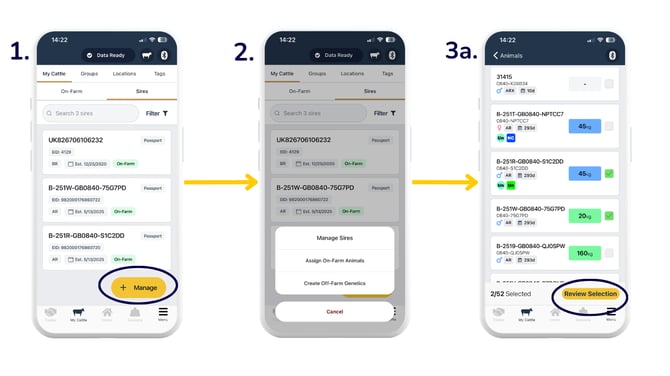
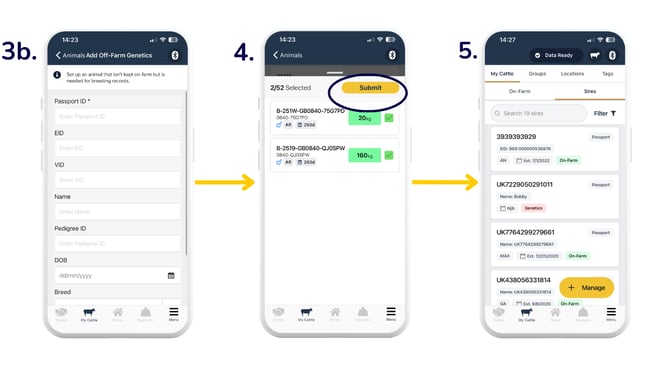
- 'Create Off-Farm Genetics'. This will allow you to create off-farm genetics for sires that are not on farm. Simply fill in the required details in the form as necessary.
- 'Assign On-Farm Animals'. This will provide you with a list of animals that you currently have on farm. Select the animals you wish to add to your sire table by tapping the tickboxes. Once selected, click 'Review Selection'.
- Review the selection of animals, and once you are happy, click 'Submit'.
- Your 'Sires' list will then show you a list of both on-farm and off-farm sires.
- When logging births through the Breedr app, you can select the breeding method, which then gives you the option to select sires from your list.
%20(5).png?width=670&height=377&name=Copy%20of%20Oct%2024%20TEMPLATE%20(YouTube%20Thumbnail)%20(5).png)
Editing a sire from your list in the mobile app:
- You can edit 'On-Farm' and 'Genetics' animals. Click into the animal you wish to edit.
- For off-farm 'Genetics', simply alter or fill out the details in the form as required and click 'Save'.
- For 'On-Farm' animals, select 'Manage' > 'Edit' and edit the details as required.
%20(6).png?width=670&height=377&name=Copy%20of%20Oct%2024%20TEMPLATE%20(YouTube%20Thumbnail)%20(6).png)
Note: When editing 'On-Farm' animals, some fields may be restricted, meaning you cannot edit these fields. If you still need help, please reach out to the Customer Support team.
Manage sires in the web app:
Manage sires via CSV import:
View sire performance:
Recording sires is a great way to keep track of the genealogy of your animals.
You can log onto your web app and go to 'Reports' to find the 'Sire and Dam Performance' report. This report includes offspring performance against each sire.
Need some help? Use the chat window to your right on the web or the help button on your mobile app, call our Customer Support team on +44 (0) 3300 436327 or email support@breedr.co.