
In Breedr, you can record a Sires List with the ability to add, edit or remove sires from your account.
Sires recorded in your Sires List display as options to select for when you go on to record activities such as logging a birth or other breeding activities. You can also retrospectively add a sire to an existing animal record by editing the animal.
Adding a sire to your Sires List in the mobile app:
- Go to 'Menu' > 'Settings'.
- 'Sires List'.
- Click the yellow '+' button to add a new sire.
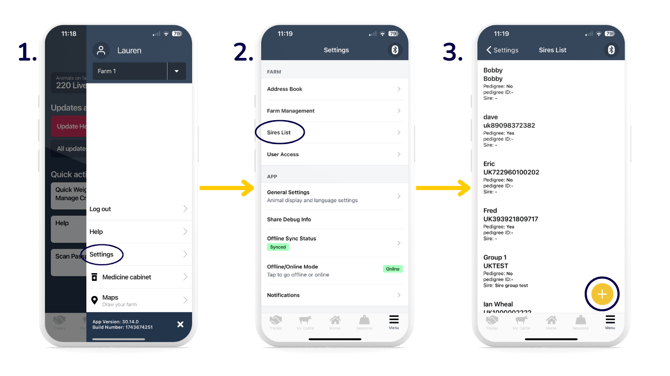
- Add in the sire details.
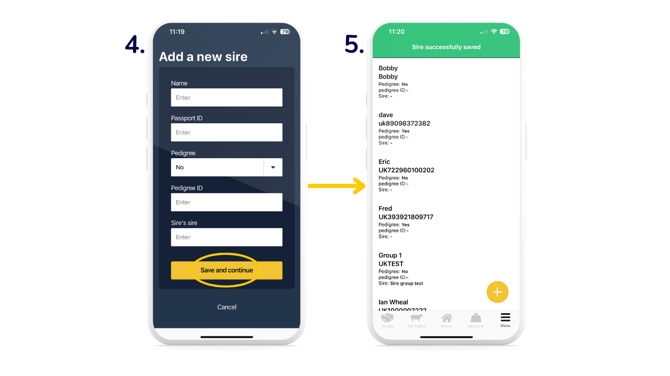
- The 'Sire successfully saved' green banner will appear, and the sire will now be visible in your list.
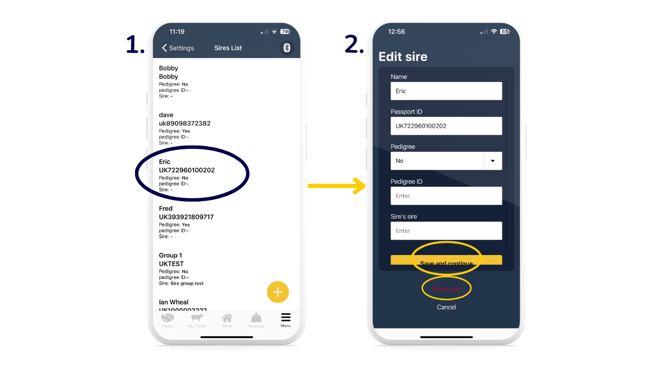
Editing or deleting a sire in your Sires List in the mobile app:
- From your Sires List, select a sire you want to edit or delete.
- To edit, change the details you need to edit in the white fields > 'Save and continue'. To delete, select the red 'Delete sire' option.
Note: If you delete a sire, it will still be visible in the 'Sire and Dam Performance' report if it has been recorded against an offspring's records. If it has not been recorded against any animal, then it will not be visible in the report.
Managing your Sires List in the web app:
You have the same functionality on the web app as you do on the mobile app in terms of adding, editing and deleting a sire from your Sires List:
Viewing sire performance in a report:
Recording sires is a great way to keep track of the genealogy of your animals.
You can log onto your web app and go to your reports to find the 'Sire and Dam Performance' report. This report includes offspring performance against each sire.
Relevant articles:
Update EID and/or VIDs against animals
View animal information on your mobile app
Record Breeding activities in Breedr
Need some help? Use the chat window to your right on the web or the help button on your mobile app, call our Customer Support team on +44 (0) 3300 436327 or email support@breedr.co.