
This article covers the recommended workflow for a natural service breeding program. For AI and embryo transfer programs, see Log Estrus and AI.
Step 1: Add Your Sire
Before logging any breeding activity, your bull needs to be in Breedr. Add him to your Breeding Stock list so he can be selected when logging services and births.
See Adding to Breeding Stock for full steps, the sire must be in your Breeding Stock list before he can be selected here.
Step 2: Group your Breeding Animals
Put your cows and heifers into a Group or Location before bull turnout. This makes it easy to log a service date to all animals in the group at once rather than one by one.
See Create, Edit and Delete a Group and Create, Edit and Delete a Location.
Step 3: Log the Service
Log the date your bull went in with the cow group. This is the start of your calving window calculation in Breedr.
To log a Service to a Group of Cows:
- Go to My Cattle and open the Group or Location containing your breeding cows.
- Tap "+ Manage" and select all animals, or select a subset.
- Tap "Manage" then "Log activity."
- Select "Breeding" from the activity categories.
- Select "Introduce SIRE."
- Enter the service date (bull turnout date).
- Select the sire from your Breeding Stock list.
- Add any notes if needed.
- Tap "Save." The service is logged to all selected cows.
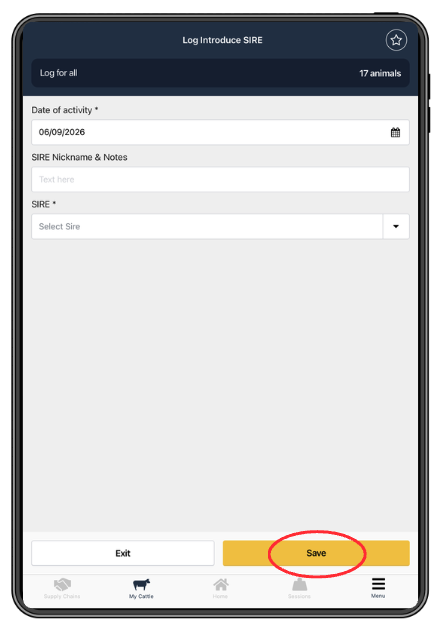
To log a service to one cow:
Follow the same steps above from the individual animal's record using "+ Manage" > "Log activity" > "Introduce SIRE."
Step 4: Log Pregnancy Checks
After your bull turnout period, pregnancy check your cows and log the results in Breedr. This updates each animal's breeding status and feeds into your Birth Forecast Report.
See Log a Pregnancy Check for full steps.
Use Quick Actions in Chute Mode to log pregnancy check results to each animal as it comes through the chute without navigating menus. See Quick Actions in Chute Mode.
Step 5: Record Calves at Birth
When calves start arriving, log each birth in Breedr. Recording births:
- Adds the calf as a new animal on your account
- Links the calf to the dam and sire
- Records birth weight, calving ease, and calf vigor
- Updates the dam's calving record and breeding history
See Log a Birth - Mobile for full steps.
Data tip: Calving ease and birth weight recorded at calving are used in your Sire and Dam Performance reports. The more consistently you record them, the more useful those reports become for future sire selection decisions.
Step 6: Weigh Calves
Get early weights on calves using Chute Mode. Birth weight plus your first post-calving weight gives you the calf's early growth rate, which feeds into your ADWG calculations.
See Get Started with Chute Mode.
Step 7: Log Weaning
Record weaning weights and dates when you pull calves. Weaning weight is one of the most important data points for evaluating both dam performance and sire EPDs.
See Log Weaning - Mobile for full steps.
Track Your Progress with Reports
Once data is being logged, these reports give you visibility across the breeding season:
| Report | What it shows |
|---|---|
| Birth Forecast | Expected calving dates based on service and pregnancy check records |
| Breeding History | Full record of services, pregnancy checks, and births per animal |
| Sire and Dam Performance | Calving ease, birth weight, and growth data by sire and dam |
| Herd Health Report | Treatment overview across cows and calves during calving |
Access all reports at app.breedr.tech under Reports in the left-hand navigation. See How to Download a Report.
Create Alerts for Key Calving Dates
Set reminders in Breedr so you get notified when cows are approaching their due dates or when follow-up checks are due.
Need some help?
Use the chat window, call our Customer Success team at (737) 412-3131 or email support supportusa@breedr.co